Frequently Asked Questions
What I find truly baffling are manuals – hundreds of pages long – that accompany software applications, programming languages, and operating systems. Unmistakably, they signal both a contorted design that lacks clear concepts and an intent to hook customers.
- How (and Why) G-WAN is different from other HTTP servers
- G-WAN sandboxing + memory-safety, and 2026 Web regulatory requirements
- How benchmarks reveal "by-design" weaknesses in all HTTP servers
- Why G-WAN embeds a new benchmark tool, and how it's different
- G-WAN v16+ readiness – 2024 real-World deployments
- Fitness of G-WAN on Virtual Private Server (VPS) or "Cloud instance"
- Why G-WAN's design is "zero-configuration", and why it matters
- How to: G-WAN's number of concurrent clients
- G-WAN Caching Levels and G-WAN Caching Reverse-Proxy
- Human-readable Crash Reports and Automated Disaster-Recovery
- G-WAN & CGI, ISAPI, mod_perl, FastCGI, SSI, PHP-CLI/PHP-FPM, uWSGI
- G-WAN supported HTTP versions, headers and security-by-design
- Usefulness of CDNs – doing much better, without a redundant infrastructure
- How to: G-WAN Hosts, Virtual-Hosts, Aliases and Listeners
- How to: file/folder permissions
- How to: URL/URI rewrites (the Apache "pretty permalinks")
- How to: folder aliases to avoid redirections
- How to: Gzip compression and G-WAN caching (expires)
- How to: custom HTTP error pages
- How to: DNS (Domain Name Service) & NICs (Network Interface Cards)
- Why G-WAN provides a 'ps' process-search command
- How to identity the purpose of a specific executable
- How to: get the CPU and/or RAM Hogs with G-WAN
- How G-WAN lists the OS, NICs, CPU/RAM/Disk used and free space
- G-WAN servlets: missing library header
- G-WAN servlets: library undefined symbol
- G-WAN servlets: using libraries
- G-WAN servlets: using libraries from gwan/libraries
- G-WAN servlets: installing system-wide libraries
- G-WAN handlers: how to trace crashes
- Portablility of G-WAN's source code
- Recommended Operating Systems
- Hypervisors
- Why G-WAN is not Open-Source
- Changing the PATH environment variable
- Setting ENVIRONMENT variables
- Why are ENVIRONMENT variables ignored
- Service Mode
- Cron Jobs (maintenance)
- Support of Programming Languages
- Setup of Programming Languages
- Questions Not Answered Here
How G-WAN (and Why) is different from other HTTP servers
δI started to write software in 1979 in asm. In 2007 I thought about G-WAN – to save time, money and nerves (all other servers are too slow, complex and unsafe – designed to keep us desperately trying to resolve problems that should not exist in the first place).
Since 2009, G-WAN is much faster, safer, more frugal (with disk/CPU/RAM) and easier to use – and in 2024 it outperformed itself:
- G-WAN 2025 tops at 242m RPS without a single error (with caching: 281m RPS without a single error)
- NGINX 2025 tops at 635k RPS with errors at concurrencies > 10k (with caching)
- LITESPEED 2025 tops at 279k RPS with many errors at all concurrencies (with caching)
All our 2025 AB (Apache Benchmark) and wrk2 (NGINX benchmark) tests are available here.
The NGINX and LITESPEED "socket errors" happen because their architectures and implementations are unable to process connections and requests in a timely fashion. As a result, frustrated clients double-down their attempts, raising the load on servers overwhelmed by thousands of RPS. Despite serving millions of RPS, G-WAN has no errors.
It is disarmingly simple to explain why (and how it will worsen as time goes):

NGINX and LITESPEED force people to wait for their turn (in each per-process/thread event-based queue, only one person can embark at any given time). The more CPU Cores and processes/threads, the higher the CPU and RAM overheads – and the wait times for the people queuing to embark. |

G-WAN lets tens of thousands of people travel together (each thread lets hundreds of thousands of people make a step forward altogether). The more CPU Cores and threads, the lower the CPU/RAM overheads – and the latency between steps. |
But G-WAN was also designed to simplify everything under its reach:
- adding an host/virtual-host/alias by creating a sub-folder or symlink,
- delivering the best available performance by-design, without configuration,
- setting custom HTTP error HTML pages by-design, without any configuration,
- setting files and directories access-rights by-design, without any configuration,
- running "edit & play" servlets by-design (in C and any other language you wish),
- handling fatal errors and server/servlet crashes gracefully (in logs and terminals),
- durability: designed to support several OSes and CPUs (while surviving their updates).
And G-WAN provides never-seen-before (in a Web server) detailed system information and features facilitating decision-taking (like for short-term crisis solving, monitoring, audits, or long-term resources provisioning).
Decade after decade, G-WAN has consistently advanced the state of the Art:
- G-WAN/no-cache runs at 242m RPS (450+ times higher than NGINX/no-cache, 867x higher than LITESPEED+cache)
- G-WAN's startup memory-footprint grows/shrinks (usually from 512 KB to 3 MB RSS) depending on the traffic
- G-WAN and servlets are sandboxed in the G-WAN folder at startup (you can ditch RAM/CPU-hungry buggy VMs)
- G-WAN has provided "edit & play" servlets in 18 programming languages (but now all languages are supported!)
- G-WAN has still no vulnerabilities, unlike Apache2 (51 since 2006), NGINX (4+ per month), LITESPEED (37 since 2005)
- G-WAN works with zero-configuration (relying on adaptive options vs. arcane, proprietary configuration files)
- G-WAN and its servlets enjoy "memory-safety" via SLIMalloc (yet another handy, time and money saving exclusivity)
- G-WAN and its servlets continue unharmed by fatal errors (eg: divison by zero), and log useful crash-reports.
G-WAN runs seamlessly under Linux WINE (a Windows re-rewrite relying on Unix – both on Intel and Arm CPUs) but Microsoft Windows "Defender" deletes our G-WAN binary even before it can be run or copied to disk (help is most welcome).
G-WAN should run under Apple's Mac OSX (on Arm CPUs) – but, while G-WAN 2009 was written on two 2008 MacPro (AMD64) machines, we now lack the recent Arm-based Apple hardware and OSX version required to test our code (sponsoring is welcome).
G-WAN offers very desirable features that nobody (despite the trillions of dollars invested) has ever offered. The kind of things that make the difference between economic life and death for most users (if you are not financed, having to switch to Rust is the promise of perfectly avoidable endless, carefully-designed, sophisticated pains):
- how useful is it for Web servers to support "memory-unsafe" PHP if international regulations now forbid to deploy it?
- how usefull are the ever-funded Web leaders if what they do now requires 0.001% of the expenses?
Value is not in the boring, clunky, vulnerable-by-design features that everyone has (via "copy & paste").
Value is in the features that everyone needs – and cannot find anywhere.
G-WAN sandboxing + memory-safety, and 2026 Web regulatory requirements
δG-WAN stores all its files (websites, logs, etc.) in sub-directories of the location of its executable (the gwan file).
Having it all at the same place makes things much simpler – and much safer since G-WAN then irrevocably jails itself (and any children threads/processes) to:
- limit access to the file-system (2021+ Landlock LSM)
- restrict the available syscalls (2010+ SECCOMP BPF filter)
Since 2009, G-WAN had no vulnerability (both on Windows and Linux), but as an Application server, the OS kernel, servlets and libraries may introduce security issues, see SSL or TLS (which should be a major concern for so-called "security layers").
So it makes sense to use every possible way that contributes to exclude uncertainty - including SLIMalloc (2020-2023), which makes G-WAN and all libraries and servlets "memory-safe":
G-WAN's objective, heavily tested security published on ResearchGate is a clear improvement of the "State of the Art":
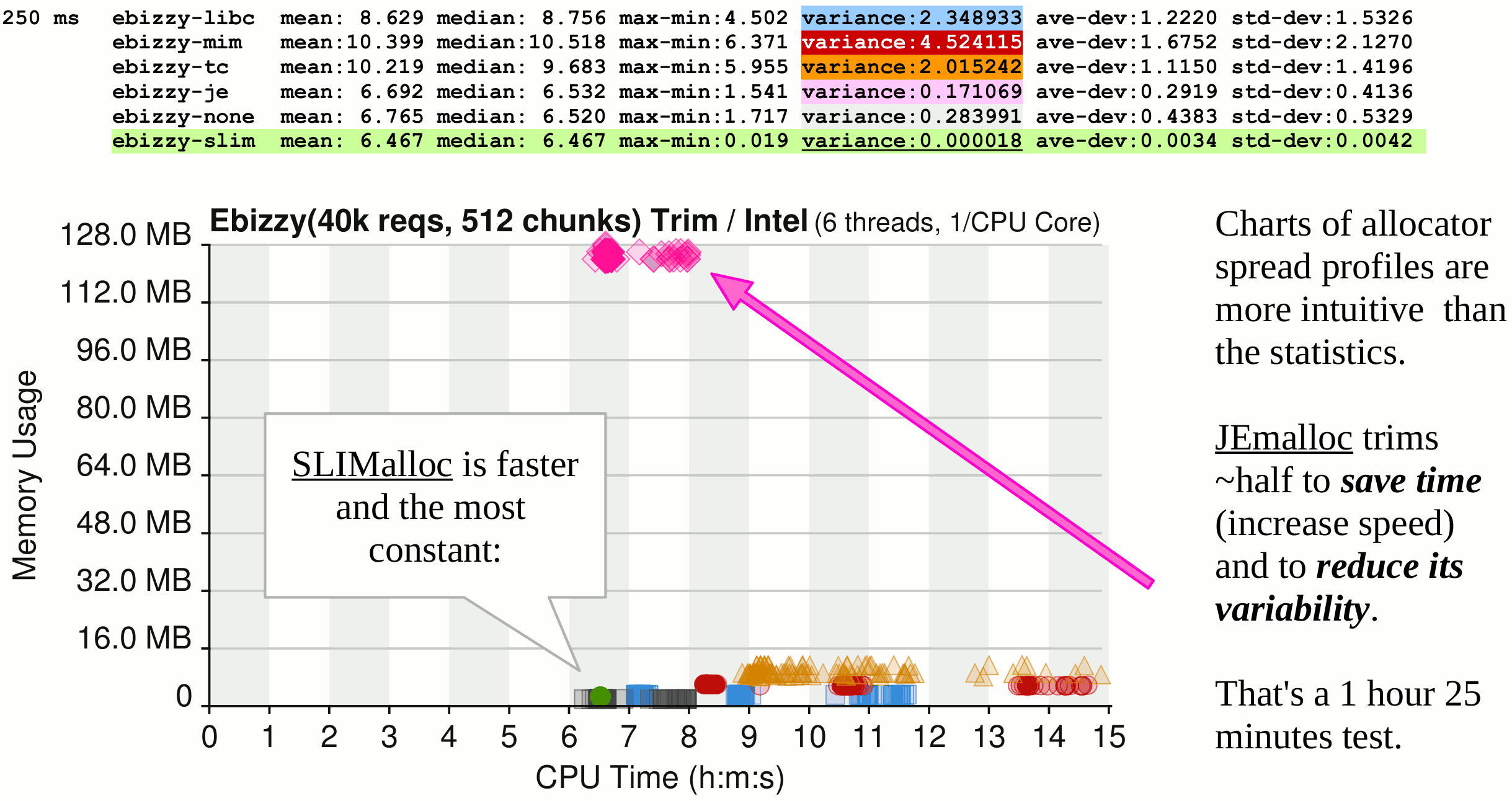
Especially if you consider the fact that SLIMalloc is the only one here to deliver "memory-safety" to C and C++... in real-time, faster than those who are unsafe and inject their by-design vulnerabilities in the OS, libraries, applications and... the so-called "memory-safe" runtimes of Java and .Net where "memory corruption" is exploited for decades.
Think that memory-safety is a virtual and benign threat? Think again:
2024: a GNU LibC heap-based buffer overflow "Grants [Remote] Attackers Root Access on Major Linux Distros".
"A threat actor could exploit the flaw to obtain elevated permissions via specially crafted inputs to [network] applications that employ these [syslog] logging functions."
Think that memory allocation issues are rare? The GAFAM claim that "memory-safety issues" account for:
"70% to 90% of the root causes of all vulnerabilities" that APPLE, MICROSOFT and GOOGLE report as "unfixable" [1] [2] [3].
Some programming languages claim to be "memory-safe". Yet, even the Rust runtime had memory-safety vulnerabilities. Worse, they all ignore the fact that they invoke operating system features (kernel and usermode) written in C which, without SLIMalloc, are not "memory-safe". This critical issue has been documented by several governments:
The cyber security government agencies of "the five eyes" have have published a 2023 PDF document titled "The Case for Memory Safe Roadmaps, Why Both C-Suite Executives and Technical Experts Need to Take Memory Safe Coding Seriously" which states:
"software written in Rust can contain the 'unsafe' keyword. There are several important reasons to use this keyword, such as directly interacting with the operating system. However, developers should not use this keyword to avoid introducing memory safety vulnerabilities".
As the problem is officially documented, why has the US DARPA furiously censored the January 2023 SLIMalloc paper in April 2023 instead of deploying it to secure all our operating systems written in C? And why is the January 2023 SLIMalloc paper about "memory-safety" absent from the long list of technical references (promoting learned-helplessness) of the above official December 2023 "five eyes" document?
It's simple: not deploying SLIMalloc allows Rust applications to be vulnerable to "memory-safety" operating systems security holes... which are, like Rust, totally under the control of the GAFAM (the vendors of our operating systems).
So, imposing Rust enforces:
- a new steep learning curve and entirely new levels of incoherence and inefficiency imposed worldwide (call this "progress" if you can);
- a new GAFAM-controlled monopoly about the list of regulatory-allowed programming languages (delivered with patented(!) backdoors);
- the exclusion of SLIMalloc which has made all the languages written in C "memory-safe" – a far more attractive propositon than Rust;
- the availability of operating system vulnerabilities (notoriously created, patented and sold by the industry to all government agencies).
This episode demonstrates that Cyber Security is too serious a matter to be delegated to governments and a few "trusted" (yet obviously not "trustworthy") Defense contractors seeking to strengthen their rapacious grip on the monopoly of creating and selling vulnerabilities and eye-wateringly expensive placebos (if their "security" products were usefull, the problem would be resolved, and not generate a revenue growing exponentially).
On the bright side of things: PHP did not expect G-WAN to make it "memory-safe", yet that's the only way for PHP to become compliant (and the same is true for all the other programming languages written in C).
How benchmarks reveal "by-design" weaknesses in all HTTP servers
δBenchmarks let you know how well an application works. In the past, we have been using Weighttp (a good ApacheBench evolution) but things and people have changed, and we now use IBM Apache Benchmark (AB) and NGINX wrk2 because that's what LITESPEED and NGINX insist "is more relevant"... to each of them.
We have done this to avoid the cherry-picking done by LITESPEED (in love with AB) and NGINX (in love with wrk2), see below their respective AB/wrk2 tests. Instead, we have accepted both challenges' rules – leading to big surprises:
- AB being single-threaded, it cannot saturate the G-WAN multi-threaded server, yet, G-WAN performs better than LITESPEED at this exercise (especially if you take into account the many LITESPEED "failed requests" – see its AB test).
- wrk/wrk2 being multi-threaded, G-WAN serves hundreds of MILLIONS of RPS vs. hundreds of THOUSANDS of RPS for NGINX (wrk2 is presented by his author as "a slower but more correct version" of wrk, read here why).
- wrk3 (wrk2 corrected by me) fixes 4 major parallelism bugs of wrk/wrk2, see my dedicated blog post explaining how these bugs (totally defeating the purpose of benchmarking) have been kept uncovered for 14 years!
- G-WAN benchmark tool will eventually provide the much-needed "final" word of this saga, by providing the long awaited (and long overdue) capacity to test fast servers (such as G-WAN). Unlike memory-hungry wrk/2/3 the G-WAN benchmark tools will let anyone compare servers such as NGINX and G-WAN... on any machine – including 4 GB RAM MiniPCs (the slow architecture of wrk/2/3 consumes too much RAM to test high concurrencies on most computers).
Logs were disabled for all servers. Caching was enabled for NGINX and LITESPEED (even if G-WAN did not support caching yet at the time of the first tests, hence two series were done for G-WAN, with and without caching). All of our benchmarks are detailed and commented: click each server's dotted link below.
wrk2 TESTS:

G-WAN 17.08.18 (no cache) => [106k - 242m] RPS, [0.7 - 668 MB] RSS, 0 socket errors
  1: 106k RPS
 1k: 1.2m RPS
10k: 242m RPS --> G-WAN peak RPS
20k: 113m RPS
30k:  74m RPS
40k:  53m RPS

G-WAN 17.10.01 (with cache) => [129k - 281m] RPS, [0.7 - 668 MB] RSS, 0 socket errors
  1: 129k RPS
 1k: 1.8m RPS
10k: 281m RPS --> G-WAN peak RPS
20k: 140m RPS
30k:  91m RPS
40k:  63m RPS
--------------------------------------------------------------------------------
LITESPEED Enterprise 6.3.4 (with cache) => [116k - 565k] RPS, [54.8 - 172.7 MB] RSS, 285k socket errors
  1: 116k RPS, Socket errors: read 116
 1k: 565k RPS  --> LITESPEED peak RPS
10k: 279k RPS, Socket errors: timeout 7,451
20k: 220k RPS, Socket errors: timeout 44,312
30k: 201k RPS, Socket errors: timeout 85,010
40k: 180k RPS, Socket errors: timeout 148,176
--------------------------------------------------------------------------------
NGINX 1.24.0 (with cache) => [89k - 944k] RPS, [130.9 - 143.8 MB] RSS, 29k socket errors, 648 non-2xx responses
  1:  89k RPS
 1k: 944k RPS --> NGINX peak RPS
10k: 635k RPS
20k: 561k RPS, Non-2xx or 3xx responses: 8
30k: 489k RPS, Non-2xx or 3xx responses: 29
40k: 474k RPS, Non-2xx or 3xx responses: 611, Socket errors: timeout 29040
================================================================================
First 2025 tests without caching (used by the "G-WAN vs NGINX" bar chart):
--------------------------------------------------------------------------------
G-WAN 17.04.04 (no-cache) => [58m - 242m] RPS, 0 socket errors
10k: 242m RPS
20k: 120m RPS
30k:  76m RPS
40k:  58m RPS
--------------------------------------------------------------------------------
NGINX 1.24.0 (no-cache) => [343k - 555k] RPS, 207k socket errors
10k: 555k RPS, timeouts: 5,358
20k: 441k RPS, timeouts: 22,539
30k: 371k RPS, timeouts: 62,312
40k: 343k RPS, timeouts: 117,097
G-WAN delivers MILLIONS of RPS (without error) instead of THOUSANDS of RPS with many errors (for LITESPEED and NGINX).
So, even if you can tune an OS or a server to run it twice faster, the results are the same: G-WAN is faster by 3 orders of magnitude.
AB TESTS:

G-WAN 17.08.18 (no cache)          => 111k RPS,  0.7 MB RSS,   0 failed requests
G-WAN 17.10.01 (/w cache)          => 137k RPS,  0.7 MB RSS,   0 failed requests
LITESPEED Enterprise 6.3.4 (/w cache) => 121k RPS, 54.8 MB RSS,  99 failed requests
NGINX 1.24.0 (/w cache)             => 92k RPS, 130.9 MB RSS,   0 failed requests
Unlike wrk2, AB is not multi-threaded – hence its inability to extract decent concurrency from the servers. To prove this, and to make sure that AB's reported "failed requests" count was a fair report for LITESPEED (and not just an isolated glitch), we have made half a dozen AB tests (with an increasing number of connections) for LITESPEED. All AB results are better than wrk2 – for LITESPEED only, and most LITESPEED AB/wrk2 tests have similar errors (click on the above link to see them).
The reason why LITESPEED prefers AB comes from its small initial server setup. On our 32-Core CPU, LITESPEED runs 2 worker processes of 6 threads each – as compared to NGINX (32 worker processes of 1 thread each).
- Less workers (either threads or processes) give better results with low concurrencies (less scheduling overhead).
- More workers (either threads or processes) give better results with high concurrencies (due to the need for scheduling).
NGINX and LITESPEED start with a configured number of workers. G-WAN starts small and grows/shrinks on-demand.
G-WAN's adaptive way is more difficult to do right – but it scales and performs much better.
Why G-WAN embeds a new benchmark tool, and how it's different
δThe short answer is that:
Benchmark tools MUST be faster than the servers they test as servers CAN'T reply to requests faster than sent by clients.
The long story is that:
- not reflecting real life, wrk/wrk2 establish all the connections first, then 'calibrate' them, and after up to 10 seconds (said their authors, while in reality it can last minutes!), start sending requests. The motivation was probably to remove the NGINX slow accepts from the benchmark statistics therefore hiding NGINX's inability to process MOST of the client connections (a much, much worse issue than the combined TCP and TLS RTT latencies!), and to hit the G-WAN slow-clients/requesless-connections DDoS shield – without enlarging the G-WAN time-outs (as we documented in 2013 that it was required for wrk benchmarks);
- since the thread calibration takes too much time (10 seconds + (5 * thread connections)), since wrk2 setups a stop_at time before creating the threads and a start time after creating and calibrating the threads, the calculation of RPS req_per_s = complete / runtime_s; turns the division into a multiplication (leading to bogus values) as the test time (default 10 seconds) becomes inferior to 1 second. I have fixed no less than 4 unpardonable multi-threading programming errors in wrk2. SO, ALL THE WRK & WRK2 BENCHMARKS DONE SINCE 2012 ARE... BOGUS (AND NOBODY HAS EVER NOTICED). wrk/wrk2 were released in 2012. In 2026, those 14-year old by-design flaws generate a volatility of the wrk/wrk2 results based on bogus arithmetic (rather than server performance) that defeat their official purpose as benchmark tools.
- for low concurrencies, wrk/wrk2 have always been, and by far, the bottleneck with G-WAN, this is true since day one, but it became much worse in 2024;
- for high concurrencies, wrk/wrk2 are agonizingly slow, consuming way too much RAM (190 GB for 40k users!) making relevant tests impossible on most machines... while 50k and even 100k users wrk tests were done in 2013 on a 12 GB RAM PC. wrk/wrk2 prevent comparisons in the high concurrencies (were NGINX has never performed);
- when wrk is slower than the server it claims to "benchmark", completing one single test run may take hours, days or even weeks (depending on the server speed and scalability) – only because this benchmarking tool (NGINX's favorite), is suffocating in its own fat, and needs a lot of time to merely count the server responses. Inverting what was happening in reality, some have then falsely asserted that this behavior was the proof that the tested server, among which G-WAN, was too slow for the wrk benchmark;
- wrk/wrk2 statistics (and some errors) reflect the CLIENT overheads, by-design latencies, and inefficiencies rather than the SERVER limits we are trying to identify... only because of the benchmark tool defects (in architecture and implementation);
- wrk/wrk2 test runs evaluate one given concurrency at a time (rather than a whole range), generating costly TCP TIME_WAIT states that take time to disappear before a new test run can be safely restarted (this is an issue when doing repeated tests, even more when gradually increasing concurrencies);
- wrk2's Coordinated Omission correction injects latency values when "the client providing the load has been blocked" (waiting for a server response) beyond the expected expected_interval. But if the client is slower than the server, that's the wrk2 client latencies that are registered and heavily multiplied... and its total irrelevance celebrated as an achievement;
- wrk2 -R (client RPS) is a nice addition to wrk, but it must be specified by the end-users – while its optimal value depends on the client, server, CPU and OS (so it is much better to let the benchmark tool find it automatically);
- a new automated benchmark enforcing a consistent methodology (1) progressively raising the number of users: 1,10,100,10k,20k...100k users (without closing connections, so like real-life growing traffic) has real value to (2) save people's time, and to (3) make sure that only well-documented, replicable benchmarks are delivered;
- excluding the unknowns of undocumented (or unreachable for most) fancy hardware (100 Mbps to 40 Gbps switch/NICs/"Cloud instances", etc.) has tremendous value: here only the automatically documented OS, disk, CPU, RAM and HTTP server are tested. Trustworthy data is the necessary basis for any fruitful discussion.
And obviously, any benchmark tool slower than wrk/wrk2 (that is, almost all others) is even worse – for all the reasons invoked above, you are benchmarking the test tool, not the HTTP server. That's how a very few abuse the ignorance of the many.
These issues do not matter much with slow servers, but G-WAN being so much faster than other servers, the problems caused by slow benchmark tools are magnified, sometimes by several orders of magnitude, to the point of reaching total irrelevance!
The only way to resolve these many problems was to create a non-biased benchmark tool that would work for everybody – fast and slow servers – by making it find the highest RPS-rate supported by any given server at each concurrency level on a large range... preferably automatically and without wait states (affecting the CPU, RAM and TCP/IP stack).
To avoid the accusation of introducing more (or new) bias, I have had to (1) demonstrate as done above why the best existing solutions are inadequate and (2) introduce a new benchmark tool doing its very best at self-adapting itself to the tested CPU, OS and server.
The G-WAN benchmark tool will not fail you, not trick you, not abuse you, not ask you to know things that only a very few can do – it will just do the job, serve its purpose as a tool designed to help you evaluate the true capacity of any given server slower than the G-WAN benchmark tool (which is faster than the G-WAN server because it relies on the same architecture while doing much less things).
In the same spirit as ab.c, our 2009 wrapper for IBM ApacheBench (AB), Lighttpd Weighttp and HP HTTPerf, the goal is to deliver a data set (and charts) for a relevant [0-100k] concurrency range reflecting today's hardware capacity.
Unlike for ab.c, I can't release its source code because this new benchmark tool (while a freeware) relies on the obviously so much more efficient G-WAN architecture and implementation.
That is its promise. But don't take it as granted – just compare it to other tools and see by yourself what works better.
Find a bug or think a new feature would be useful? Drop me a line – my only goal is to make it as good as possible!
G-WAN v16+ readiness – 2024 real-World deployments
δThis new codebase (a complete rewrite) has been used in production since 2024, for different Web applications (each deployed on many fixed sites and mobile platforms) such as:
- for an international network of schools – generating PDF questionnaires on-demand from a SQL database of Q&A, collecting online scanned student test answers, checking the good/bad answers to generate PDF reports for each student and for aggregated notes – per classroom, per teacher, secured by custom vectorial QR-Codes embedded in PDF files (410 pages analyzed by second on one single 2008 Intel Nehalem Xeon CPU Core @ 3.33 GHz, with English and UNICODE text in different alphabets).
- for a network of warehouses, distributors and traveling vendors – a distributed SQL Web application used by many vendors, distributors and resellers, and point-of-sale vendors with thousands of products made of other tens of thousands of sub-products, packaging, pricing schemes, various volume/weight/casing units and language conversions, custom searches, filters, and validations for reporting – all synchronized even when connectivity was intermittent or lacking (mobile users, global coverage in many countries).
- for a company migrating from MICROSOFT Excel to online SQL databases – a real-time MICROSOFT Excel import-to-SQL and export-from-SQL platform, supporting MS-Excel data, styles, formulas, input validations, with the detection and automatic correction user-input errors and inconsistencies (eg: gazillions of references were fat-fingered or left blank, and a same product was sold under many different descriptions, under different packagings and sometimes invalid pricing and units – invariably leading to deadly SQL foreign key violations).
This was a great (sometimes challenging) way to exercise our G-WAN SQL API (wrappers for the SQLite API that let programmers only use 3 C functions safely handling every possible SQL requests while getting the results in JSON/CSV/XML/TEXT/HTML and other formats). Many of these requests had more than 100 lines of SQL, some had more than 700 lines. Saving time starts with making complex things much simpler (and faster, here with in-memory, automatically synchronized, SQLite tables).
My customers had hundreds of tables, and some screens required SQL queries that were 700 lines long (just the SQL itself, so you can imagine what it's like when you have to break it all down by hand using the complex SQLite API, prepared statements, etc. – you need thousands of lines of C code, just for a single SQL query).
So, my goal was to:
- simplify usage with 1 C function call (instead of hundreds or thousands per SQL request),
- ensure portability (via encapsualtion) from one database engine to another,
- avoid programming errors and vulnerabilities caused by SQL and SQLite complexity,
- make the best technical choices (in-memory tables, prepared_statement, inplace output formatting in JSON/CSV/XML/TEXT/HTML, automated backups and synchronization, multi-threading, etc.) so that everything could run seamlessly and faster.
So, I have created 3 functions that encapsulate all the necessary SQLite API functions to perform every possible SQL query with a single function call: sql_GetValues(), sql_Query() and sql_QuerySteps():
// ---------------------------------------------------------
// Simple SELECT (you may get as many values as needed):

sql_GetValues(argv, db,
"SELECT transac_id FROM transac_favorite WHERE name=%s", trname, &id);

// ---------------------------------------------------------
// Complex SELECT yet without parameters (note the 'fmt_json' output):

sql_Query(argv, db, reply, &fmt_json,
"SELECT" // ":" make a UNIQUE ITEM_OD for each INSTOCK
// so Tabulator doesn't aggregate all in 1 entry:
" (item.item_od || ':' || instock.rowid) AS 'item-item_od',"
" item.name, item.minimum, instock.qty,"
" ifnull(vendor.name,'') AS 'vendor-name',"
" ifnull(instock.cost_price,'') AS 'instock-cost_price',"

// --- LAST_PRICE ---------------------------------------
"(SELECT cost_price FROM instock"
" WHERE instock.item_od=item.item_od"
" ORDER BY rowid DESC LIMIT 1) AS 'lastprice',"

// --- AVERAGE PRICE ------------------------------------
"(SELECT AVG(cost_price) FROM instock"
" WHERE instock.item_od=item.item_od) AS 'aveprice',"

// --- STOCK QUANTITY -----------------------------------
"(instock.qty - instock.amount_sold) AS 'instock-qty',"

// --- AVERAGE STOCK ------------------------------------
"(SELECT CAST(AVG(qty) AS INT) FROM instock" // avoid FLOAT...
" WHERE instock.item_od=item_od) AS 'avestock',"

" ifnull(storage.name,'') AS 'storage-name'"
" FROM instock"
" JOIN item    USING(item_od)"
" JOIN storage USING(storage_od)"
" JOIN vendor  USING(vendor_od)");

// ---------------------------------------------------------
// INSERT with parameters (note the '%' locations):

ret = sql_Query(argv, db, NULL, NULL,
"INSERT INTO transac(storage_src_od, storage_dst_od,"
" vendor_od, port_od, date, transac_type_id, transac_state_id,"
" net, expenses, total)"
" VALUES(%s,%s,%s,%s,%u,%s,%u,%s,%s,%s)",
src_od, dst_od, vendor_od, port,
str2epoch(date), type, 1, net,
expenses, total);

// ---------------------------------------------------------
// Variant: UPDATE with paramètres (note the '%' locations):

ret = sql_Query(argv, db, NULL, NULL,
      "UPDATE OR REPLACE item"
      " SET item_od=%s, category_od=%s, name=%s,"
      " description=%s, barcode=%s, unit_od=%s,"
      " amount=%s, minimum=%s WHERE item_od=%s",
      u.p.iod, u.p.cat_od, u.p.name,
      u.p.desc, u.p.barcode, u.p.unit_od,
      u.p.amount, u.p.minimum, u.p.iod);

// ---------------------------------------------------------
// Requests that depend on prior results:
// (everything becomes more readable, easier to maintain)

u64 rowid = 0; // sql_GetValues() INTEGERS must always be 64-bit
sql_GetValues(argv, db,
  "SELECT rowid FROM instock WHERE item_od=%s"
  " AND vendor_od=%s AND storage_od=%s AND cost_price=%s",
  u.p.item_od, vendor_od, dst_od, u.p.price, &rowid);

if(!rowid) // IDs start from 1
{
  // no STOCK found, INSERT new STOCK entry
  ret = sql_Query(argv, db, NULL, NULL,
  "INSERT INTO instock(vendor_od, item_od, cost_price,"
               " crew_price, publ_price, qty, sort,"
               " storage_od, stock_state_id, amount_sold)"
  " VALUES(%s,%s,%s,%d,%d,%s,%d,%s,%d,%d);",
  vendor_od, u.p.item_od, u.p.price, 0, 0, u.p.qty,
  0, dst_od, 1, 0);
}
else // we have STOCK, update it
{
  ret = sql_Query(argv, db, NULL, NULL,
  "UPDATE instock"
  " SET qty = (SELECT qty=%s FROM instock WHERE rowid=%llu)"
  " WHERE rowid=%llu", u.p.qty, rowid, rowid);
}

// -----------------------------------------------------------
// Find ROOT ITEM's CHILDREN and add them to REPLY
// -----------------------------------------------------------
// - 0     OD:BEAUTY    POD:(null)    NAME:Beauty Salon
// - 0     OD:DUTY      POD:(null)    NAME:Duty Free
// - 0     OD:DECK      POD:(null)    NAME:Decks
//   1     OD:DECK2     POD:DECK      NAME:Deck One Main
//   2     OD:DECK2B    POD:DECK2     NAME:Deck 2b
//   1     OD:DECK1     POD:DECK      NAME:Deck Two Main
// -----------------------------------------------------------
int ret = sql_QuerySteps(argv, db, &stmt,
   "SELECT s2.storage_od, s2.name, s2.parent_od"
   " FROM storage s1"
   " LEFT JOIN storage s2 ON(s2.parent_od = s1.storage_od)"
   " WHERE s1.storage_od=%s", parent_od);

while((!ret))
{  ... // get parameters

   if(nam && strcmp(iod, pod))
   {
      // add CHILDREN
      level = item2tsto(tsto, nth, iod, nam, pod, dad, level);

      // RECURSION: add any grand-CHILDREN (-1:down one level)
      level = -1 + recurse(argv, tsto, nth, iod, dad, level);
   }
   else // NULL entry (end of TREE branch: we now exit)
   if(!nam && level)
      if(dad[level][0]) level = 0;
}
We also had to push things further with the Linux OS to load humongous third-party shared libraries (supporting the MS-Excel file format implies to deal with its many versioned incompatibilities) from the G-WAN static executable, and to make all this work without hitting the walls of the G-WAN sandbox.
G-WAN exists since 2009. And it evolves, the good way, as time goes: ever-faster, safer, more capable, flexible and scalable – yet ever-easier to use (because we use it daily).
Fitness of G-WAN on Virtual Private Server (VPS) or "Cloud instance"
δVirtualized servers mutualize access to CPU and RAM resources – with an overhead (while injecting more vulnerabilities than already available in the OS) – but we will see that there's much, much worse (than CPU caches trashing and spiraling TLBs).
You can deploy many G-WAN instances on a machine because they are isolated from each other (G-WAN and its servlets cannot reach files outside of each instance's directory). As a result, the VMs (their vulnerabilities and CPU/RAM overheads) are redundant.
But no hosting company deploys G-WAN (yet), so, currently, the situation is a follows:
It's obvious that "Dedicated virtual CPU Cores" or "Cloud instances" split a machine CPU and RAM between customers. But the hosting companies don't tell you that tens (or hundreds) of users are also sharing one single NIC and disk.
A shared disk or NIC will quickly become THE bottleneck (slowing-down everyone, because, hey, a virtual machine is not a new machine, it's merely real-estate time-sharing – and the some "co-renters" may want to enjoy 10 to 100% of the disk or NIC).
What can you do if a dozen of happy campers occupy the bathroom for a few hours?
There is no (enjoyable) room left for anyone else.
Even if users are not aiming to exhaust physical disk and network resources – their sheer number will do it. And, as it happened to me, I can tell that the hosting company does not care about your problems: from their point of view, you have signed a contract and they want you to pay for the thing they have explicitly called "virtual" or "cloud" (which, in reality, means "shared").
They could (and technically should) dedicate a disk and NIC to every customer, but that's raising their operating costs (in hardware, maintenance and electricity), so they don't do it.
Parcimonious programs, like G-WAN (which is both parcimonious and much faster than other servers), can help: let's compare the G-WAN memory footprint (that will grow and shrink on-demand):
 > ./gwan -p
- running gwan process(es):

    PID  THRDS  %CPU    VIRT      RSS   SHRD  EXE
 537230     17   0.0  6.9 MB  768.0 KB   0.0 KB  /opt/gwan/gwan :8080
...to the (fixed, declared in configuration files) NGINX memory footprint:
./gwan -p ng
- running nginx process(es):

    PID  THRDS  %CPU     VIRT    RSS      SHRD  EXE
   2575      1   0.0  20.9 MB  1.8 MB    1.0 MB  nginx: master process /usr/sbin/nginx -g daemon on; master_process on;
   2576      1   0.0  22.9 MB  4.0 MB    2.7 MB  nginx: worker process
   2577      1   0.0  22.9 MB  4.0 MB    2.7 MB  nginx: worker process
   2578      1   0.0  22.9 MB  4.0 MB    2.7 MB  nginx: worker process
   2579      1   0.0  22.9 MB  4.0 MB    2.7 MB  nginx: worker process
   2580      1   0.0  22.9 MB  4.0 MB    2.7 MB  nginx: worker process
   2581      1   0.0  22.9 MB  4.0 MB    2.7 MB  nginx: worker process
   2582      1   0.0  22.9 MB  4.0 MB    2.7 MB  nginx: worker process
   2583      1   0.0  22.9 MB  3.8 MB    2.5 MB  nginx: worker process
   2584      1   0.0  22.9 MB  4.0 MB    2.7 MB  nginx: worker process
   2585      1   0.0  22.9 MB  4.0 MB    2.7 MB  nginx: worker process
   2586      1   0.0  22.9 MB  4.0 MB    2.7 MB  nginx: worker process
   2588      1   0.0  22.9 MB  4.0 MB    2.7 MB  nginx: worker process
   2589      1   0.0  22.9 MB  4.0 MB    2.7 MB  nginx: worker process
   2590      1   0.0  22.9 MB  4.0 MB    2.7 MB  nginx: worker process
   2591      1   0.0  22.9 MB  4.0 MB    2.7 MB  nginx: worker process
   2592      1   0.0  22.9 MB  4.0 MB    2.7 MB  nginx: worker process
   2593      1   0.0  22.9 MB  4.0 MB    2.7 MB  nginx: worker process
   2594      1   0.0  22.9 MB  4.0 MB    2.7 MB  nginx: worker process
   2595      1   0.0  22.9 MB  4.0 MB    2.7 MB  nginx: worker process
   2596      1   0.0  22.9 MB  4.0 MB    2.7 MB  nginx: worker process
   2597      1   0.0  22.9 MB  4.0 MB    2.7 MB  nginx: worker process
   2598      1   0.0  22.9 MB  4.0 MB    2.7 MB  nginx: worker process
   2599      1   0.0  22.9 MB  4.0 MB    2.7 MB  nginx: worker process
   2600      1   0.0  22.9 MB  4.0 MB    2.7 MB  nginx: worker process
   2601      1   0.0  22.9 MB  4.0 MB    2.7 MB  nginx: worker process
   2602      1   0.0  22.9 MB  4.0 MB    2.7 MB  nginx: worker process
   2603      1   0.0  22.9 MB  4.0 MB    2.7 MB  nginx: worker process
   2604      1   0.0  22.9 MB  4.0 MB    2.7 MB  nginx: worker process
   2605      1   0.0  22.9 MB  4.0 MB    2.7 MB  nginx: worker process
   2606      1   0.0  22.9 MB  4.0 MB    2.7 MB  nginx: worker process
   2607      1   0.0  22.9 MB  4.0 MB    2.7 MB  nginx: worker process
   2608      1   0.0  22.9 MB  4.0 MB    2.7 MB  nginx: worker process
   Total: 1.8 + (31 * 4) + 3.8 + 2.7 = 132.3 MB
G-WAN serves many more simultaneous clients with much less RAM than APACHE, LITESPEED or NGINX (and G-WAN does so without any configuration nor humongous amounts of pre-allocated memory).
Why G-WAN's design is "zero-configuration", and why it matters
δSimplicity and predictability are paramount – even for the "configuration experts" (the quote below has been edited to remove the names of its authors and partners):
"Debating Apache vs. NGINX is an interesting technical discussion, but for most business owners, it's the wrong one.
The quality of the hosting configuration matters far more than the specific software. A poorly configured Apache server will be slow. A highly optimized Apache server can be incredibly fast.
This is why integrated, managed platforms have become so popular. They remove the guesswork.
A complete, managed environment built on the [xyz] Cloud Platform does not burden the user with technical choices. Instead, it provides an end-to-end stack (likely using a finely-tuned NGINX or LiteSpeed setup) that is pre-configured and optimized specifically for [xyz] and WordPress.
You get the benefits (extreme speed, rock-solid security, and scalability) without ever having to touch a configuration file or wonder if your MPM is set correctly."
If the top-ten HTTP servers monopolizing the market can only deliver "extreme speed, rock-solid security, and scalability" with a "finely-tuned, highly optimized, configuration" involving "guesswork" for us mere mortals, then how, since 2009, G-WAN can do so much better (in performance, security and scalability) "out-of-the-box" – without involving any "guesswork"?
Obviously, these endless enigmas packed in enigmas (the so vain "configuration expertise", obsoleted by a new version number) only exist for the sake of charging desperate users with consulting, Cloud, or "managed-hosting" fees.
G-WAN's value is not in the ability to waste its users' time: it is in the new horizons (cleared from usability, security and performance issues) it opens for everyone in an overcrowded market of solutions competing for the palm of the deadliest minefield (if you pay, partly cleared only, and at the highest possible cost).
G-WAN wants to remove all these obstacles (delivering the most advanced capacity) at the lowest possible price – because big things always start small, and you need all your brain-time to reach your own goals.
How to configure G-WAN's number of concurrent clients
δUnlike other Web servers like APACHE, LITESPEED or NGINX (and Application servers like GlassFish or Tomcat), G-WAN does not use configuration files: the values are adjusted on-the-fly depending on the current traffic.
In APACHE, LITESPEED or NGINX, the number of concurrent clients must be hard-coded in configuration files because they reserve the corresponding amount of memory at startup, before listening and accepting connections.
The NGINX default memory footprint (for a 32-Core CPU) is 132.3 MB, as shown in the previous Q&A.
The fixed memory footprint for "LITESPEED Enterprise" consumes 54.8 MB RAM at startup (changing the "LITESPEED Enterprise" number of worker processes is "Only Available For Web Host Elite Licenses"):
./gwan -p lite
- running litespeed process(es):

   PID  PPID THRDS  %CPU     VIRT     RSS    SHRD  EXE
 11474  1791     1   0.0  38.7 MB  17.5 MB  1.5 MB  litespeed (lshttpd - main)
 11478 11474     6   0.0  80.4 MB  17.9 MB  1.5 MB  litespeed (lshttpd - #01)
 11479 11474     6   0.0  80.4 MB  17.9 MB  1.5 MB  litespeed (lshttpd - #02)
 Total: 17.5 + (2 * 17.9) + 1.5 = 54.8 MB
In contrast, G-WAN starts with a 768 KB (70x lower than LITESPEED, and 172 times lower than NGINX) memory footprint because G-WAN allocates memory on-demand rather than upfront.
And load tests show that under heavy loads G-WAN's memory consumption will grow far slower than for the APACHE, LITESPEED and NGINX servers... while G-WAN is serving 3 orders of magnitude more requests per second (millions instead of thousands)!
This matters: while G-WAN will not be overwhelmed by a traffic spike, APACHE, LITESPEED and NGINX will stop responding – either because the fixed option has been setup at a low value to save RAM, or because the server's scalability limit has been reached (believe it or not, all hardware and software servers have a concurrency limit).
But configuration files and fixed values also raise problems for usability, performance and security: you don't want to see your server down when your company is finally successful (or because it is under attack... probably for the same reason).
Been there, done that. Since day one, G-WAN has been designed to survive the constant attacks of our "honorable competitors"... hence its lack of vulnerabilities so far. That's not an empty promise, that's a fact.
By using adaptive variables instead of the configuration files' fixed values, the zero-configuration G-WAN server not only makes it easier for users to deploy server and applications (there's less room for errors and the learning curve is much smaller) but it also makes G-WAN both more efficient and much safer.
G-WAN Caching Levels and G-WAN Caching Reverse-Proxy
δStatic files
At startup, and then periodically, G-WAN scans the www folder to check which (static) files have changed. But there are several cache levels implemented in G-WAN, and most are not loading file contents in memory:
- file attributes: file date and size are stored (if the file is tiny, its contents are stored in memory),
- mapped files: files are mapped in memory (the file mapping is shared between threads),
- other files: files are served normally (the overhead is negligible due to the file size).
These techniques are not new: NGINX caches file attributes to limit its use of syscalls, and LITESPEED also has a 3-level cache.
For a good reason, it seems: mid-2025, G-WAN (suddenly falling from 242m RPS to 8m RPS) urgently had to implement such a cache. A Linux kernel update, between March and September (there were many during this period of time), spoiled the joy. Adding a multi-level cache brought the G-WAN performance back to 281m RPS (OS kernel syscalls are costly, even when not sabotaged).
As an odd coincidence, the next best TCP servers (not implementing HTTP parsing yet competing as HTTP 'hello world' servers) top at 8m RPS – like if G-WAN had been the only target of this OS kernel modification aimed at sparing the next best official (fake) champions (G-WAN is much faster, despite implementing full HTTP parsing). An example of the legendary fairness of the FOSS ecosystem, reminiscent of the GNU GlibC guerilla against G-WAN between 2009 and 2023 (read the pages 7-9 of this report to see how).
Having ditched the GNU LibC, G-WAN is now safe against most "system interference": a very few OS kernel syscalls are invoked, and, in case of failure, it is now trivial to identify the guilty.
Dynamic contents
To limit the discrepancy (of performance) between G-WAN and a database server, G-WAN provides a portable SQL API (of 3 functions allowing to do all the possible SQL requests) that we have used with SQLite3 (which then benefits from G-WAN's scalability). This is, and by far, today's most efficient way to use SQL databases, especially with in-memory SQLite tables (system memory is much faster than sockets used to query a separate SQL server).
Of course, if the resulting HTML document (embedding the results of SQL requests) is fetched by many users, it makes sense to put it in G-WAN's cache (which will probably be done on disk, as a static file). This is trivial for G-WAN servlets, thanks to the integrated G-WAN cache.
If the page is generated by a back-end server, you have two options. The first one is the G-WAN rewrite (the Apache "pretty permalinks") feature, that can be used to query a local URI, but also a remote back-end server. This can be very handy to make a reasonable number of dynamic content queries, but sometimes you need a more systematic approach.
The second option is the G-WAN caching reverse-proxy feature automates what G-WAN did manually in the past with its caching API:
|
Here G-WAN is deployed as a "plug & play" cache for any back-end server (from PHP to Rust or even a Linux bash script!). Back-end servers specify cache-expiration information in the HTTP headers of each resource (that's why they were made for in the first place; so, with G-WAN, there is no need for a configuration file duplicating these rules. |
When a client request cannot be satified by the www contents loaded in the G-WAN cache, then G-WAN forwards the client request to a back-end server. And the back-end reply is cached and forwarded to the client. This way, even a disastrously slow and unsafe back-end server can satisfy many clients (and benefit from G-WAN's security).
To let the G-WAN reverse-proxy find the backend server(s), create a www G-WAN sub-directory as usual (here to store the static files that you want to cache upfront), and then create a sub-directory named as follows (G-WAN will periodically scan the specified IP range to find listening backend servers):
 "192.168.10.5" ............ 1 backend server at the 192.168.10.5 IPv4 address
 "192.168.10" .............. N servers on this IPv4 prefix   (from .1 to .254)
 "192.168.10.5-15" ......... N servers on this IPv4 IP-range (from .5 to .15)
 "10.10.3, 10.10.5.4-5" .... N hosts and/or subnets can be specified
But, as an Application server, G-WAN can also cache the dynamic contents it generates itself:
To cache a file or a page generated dynamically, you can use the G-WAN Caching API with cacheadd(), cachedel() and cacheget() implemented via the G-WAN 'wait-free' KV store.
Traditionally, people deployed dedicated cache servers (also called "Web accelaration servers") like NGINX (which has a cache activated by default, see its --without-http-cache compilation option used by proxy_cache and fastcgi_cache) but also Varnish or Apache Traffic server (ATS) which are used to transparently cache the data served by backend servers... but they are hundreds or even thousands of times slower than the G-WAN internal 3-level cache, also used in the G-WAN caching reverse-proxy, so G-WAN makes things easier (zero-configuration!) and much, much faster (millions of RPS instead of thousands of RPS!).
Unless you really need several G-WAN back-end instances, you can ditch a dedicated frontend cache server: G-WAN is caching static resources by default, and you can enable G-WAN micro-caching, a RESTful feature disabled by default (see the gwan/init.c file, or the caching.c servlet to allow caching on-the-fly).
When a given URI is invoked at high concurrencies and when generating the payload take a lot of time, then (if the feature is enabled, either globally and/or in each servlet) G-WAN will automatically cache a page for 200 milliseconds (the average latency on the Internet) to make sure that the cache is up-to-date: within 200 ms, consecutive requests provide the expected result.
Requests using cookies are not cached as they are intended to be unique for each user. To use caching on a per-request basis, enable the caching feature and disable caching by using a changing query parameter (per user session id, random, counter, etc.) or use the RC_NOCACHE return value for servlets. Obviously, the cache is also disabled if a servlet returns RC_STREAMING.
But G-WAN is very fast even without micro-caching because:
- G-WAN allows dynamic content to be generated faster than the same GNU LibC program (either stand-alone or Apache/NGINX pre-compiled modules).
- G-WAN is a faster server even when micro-caching not triggered: caching hello world would actually slow-down things by involving a cache lookup where a simple static string copy is faster. Because G-WAN App. server is a faster server it serves small payloads much faster than the fastest Web servers.
When a G-WAN script has to make slow calculations (loan) or to fetch a value from a (database) backend server, the network is slow and a database is even slower so they will both produce high latencies. In this case, caching is the only way to serve hundreds of thousands of concurrent requests with a single server.
At the ORACLE Open World 2012, G-WAN has accelerated ORACLE noSQL to reach 1.2 billion TPS on a 6-Core machine. That was done by working as a cache between the 45,000 live users (and 100 millions of bots) stored by ORACLE noSQL.
For more common applications, the point of micro-caching is to avoid the need for yet another server process burning cash on another dedicated machine because G-WAN works fine as a cache (see how Varnish compared to G-WAN in 2012 – ten years later G-WAN has outperformed itself, so the other Web/app/cache servers, already so much slower than G-WAN in 2012, are now unable to compete with G-WAN).
Caching is so important that the Internet is heavily relying on distributed proxy servers (CDNs or gateways at ISPs and enterprises) and local caches (in Internet browsers like Firefox, Chrome, Opera or IE) to speedup requests and spare resources (it is pointless to fetch a valid answer already made available in the past).
Caching is also used in CPUs (that's one of the rare ways that make it possible to run non-parallelized code faster on multicore), disk controllers as well as file systems for the very same reason: saving time and resources that can be better allocated elsewhere. We as human beings call it "short-term memory" and we could hardly work without these fast look ups of recent information.
Human-readable Crash Reports and Automated Disaster-Recovery
δIf a G-WAN servlet or handler script crashes, then the server continues unharmed, issuing a detailed (SLIMalloc) crash report, either interactively (in the terminal) or in the gwan/trace log file:
  Error[SIGSEGV SEGV_ACCERR] @ mem:0x4ad65b in 'text'
   VMA beg: 0x4a6000 size:112.0 KB perm:r--p dev:103:0 inode:5 name:60162055
   VMA ptr: 0x4ad65b (30299 from beg, 84389 from end)
   VMA end: 0x4c2000
   | 74 6f 74 6f 00 67 69 66  00 20 55 54 43 00 32  |toto.gif. UTC.2|

  date: 2025.04.02 09:08:23 (UTC)
  in  : gwan pid:18080 tid:18085 @ pc:0x42fbf6

  dist: Ubuntu 24.04 LTS (6.8.0-94-generic)
  host: IBM-14
  gwan: v17.04.02 (2025)

  stack-frame   code-addr   function                                 file :   line
  --------------------------------------------------------------------------------
  7fc6818b8040  42fbf6      servlet_crash()       gwan_servlets_examples.h:    577
  7fc6818b9230  43b6e1      th_worker_http_srv()                    gwan.c:   7208
Not crashing with fatal errors is yet another G-WAN server exclusivity (for native languages compiled to machine code, so anything made in asm/C/C++, and the vast majority of languages written in asm/C/C++) because some errors are fatal (they cannot just be blocked by a signal handler): the CPU raises a fatal error, the OS handles this unrecoverable error condition by issuing a binary "core dump", and the process, with all its threads, aborts.
Presented for humans (unlike the obscure OS "core dumps"), you have all the information required to find exactly what went wrong and where (no more vodoo mysteries happening in production when nobody is watching).
Like SLIMalloc detecting, blocking, recovering and reporting memory errors (with a similar information), this allows to know what happens in real-time, without having to analyze a "core dump" with the debug information (usually stored outside of production servers) corresponding to the exact same version of the crashing binary.
If the G-WAN process crashes/freezes itself (since 2009 we haven't seen this happening consecutively to receiving client data), then the parent process (kills a frozen child if any and then) restarts a new clean child process.
In any case, a G-WAN server crash and restart is stamped and logged in the gwan/trace log file, and a crash report is also issued here, with a backtrace when available (ie: when the thread stack was not corrupted).
The break-down of threads in a child G-WAN process is explained here. In the past, G-WAN started as many worker threads as your server had physical CPU Cores. Now, G-WAN starts small and grows (and shrinks worker threads) on-demand – to spare CPU/RAM resources and achieve (even) better performance.
G-WAN & CGI, ISAPI, mod_perl, FastCGI, SSI, PHP-CLI/PHP-FPM, uWSGI
The Web was first published in 1991, more than 3 decades ago. Everything was built step by step, sometimes naively, before reaching the digital highways we have today. So, here are, by order of appearance, the architectures of the solutions to generate dynamic content, using programming languages, databases, etc.:
- 1993 CGI (Common Gateway Interface): the HTTP server executes a new process for each request; this process returns the HTML document (or picture, etc.) that the server then forwards to the client. Creating a new process for each request is a simple task (for the HTTP server), but not a cheap one: it takes time, CPU and RAM (injecting latencies).
- 1995 ISAPI (Internet Server Application Program Interface): Web Apps implemented as shared libraries are loaded by the HTTP server at startup (Microsoft IIS, Apache mod_isapi, Zeus Web Server, G-WAN servlets). This is by far the most efficient way: there is no interface at all, so no configuration is required: 1 function is called by the HTTP server. Using POSIX threads (1995), it was more difficult to implement safely (PHP is still thread-unsafe today), as bugs in Web Apps may compromise the server (hence G-WAN using Sandboxing and SLIMalloc and issuing crash-reports for deadly errors in languages like C/C++ (or written in C/C++, like Go, Lua, PHP, Python...) – without harming or stopping the HTTP server).
- 1996 mod_perl (optional Apache module): embedding a Perl interpreter. Like the G-WAN servlets (supporting 18 programming languages made "memory-safe" with SLIMalloc), the Apache mod_perl module has access to the HTTP server API, allows programmers to write handlers for all phases in an HTTP requests cycle, etc.
- 1996 FastCGI: instead of running a new CGI process for each request, several processes are started when the HTTP server starts, and they handle dynamic content requests. As compared to merely starting a CGI process, the level of complexity grew significantly: the original FastCGI implementation used ~10k lines of C code (without counting the libraries it requires). FastCGI allows thread-unsafe processes (like PHP) to run in parallel, by starting a pool of dedicated processes (at the cost of slower responses and a higher consumption of RAM and CPU). FastCGI may struggle to fit the task: too large, the FastCGI pool will waste resources, too low, the HTTP server replies will time-out (or web site visitors will lose patience) so there's a dynamic mode to load new processes (like... CGI) when the pool is fully used – yet loading an heavy process like PHP may take time (adding latencies to the time taken to execute PHP scripts), leaving many requests unhandled. Ironically, CGI may scale better: all requests will get a timely response (up to the capacity of the OS/SW/HW to run a new child process per request) because FastCGI has its own problems: (1) it uses its own events queue where people wait their turn to embark one by one (2) application output is buffered by default, and as a result (3) the whole thing may not be responsive enough with a server handling many dynamic content requests. CGI and FastCGI encourage spiraling HW expenses (that's why Facebook created a 'HipHop' (2010) translating PHP to C++ (compiled into an executable) that was 5x faster than interpreted PHP opcodes – yet 88x slower than G-WAN-2012/PHP-cli). When a server is overloaded, it makes it "natural" to think that deploying more machines will do the work – yet this may be completely avoidable by just deploying a better software architecture.
-
1997 Server Side Includes (SSI): HTML pages supporting SSI are renamed *.shtml and text fields formatted like <!--#include virtual="../text.txt" --> or <!--#exec cgi="/cgi-bin/foo.cgi" --> or <!--#echo var="REMOTE_ADDR" --> can be filled with commands, server variables or files. For programmers, the HTML page is used as a giant printf() format, with text-only formatting insertions (but with all the related security issues). SSIs are a much inferior solution to servlets (both in terms of ease of use, features, security, and performance).
SSIs (or its 1972 C printf() function G-WAN servlet equivalent) is efficient when the same static page is cached (on the server side) for all users – this will work at the fastest possible speed (yet external caches won't store them because they are often different for each user). But in G-WAN interactive Web applications (some were complex), what we have generally done was to fill HTML page with values fetched from the server via AJAX requests (see these examples [1] or [2]). -
1998 PHP ("Personal Home Page"), then renamed as "PHP: Hypertext Preprocessor": is actually an integration of the 1997 SSIs:
PHP (1998) SSIs (1997) C language (1972) <p><?= echo "$HELLO" ?></p> <p><!-- #echo var="HELLO" --></p> printf("<p>%s</p>", HELLO);
Of course, loading and parsing a text file to find the fields to update (like PHP and SSIs do it) is much slower than a C printf call. So, PHP needs many more servers than plain old C – that's called the "unstoppable march of progress" by the vendors of hardware and Cloud platforms.
Since then, PHP (like almost all "modern" languages such as C#, Go, Java, Lua, Perl, Python... all executing the system calls of OSes written in C) has integrated a large collection of third-party C libraries to add more features (to create databases, pictures, etc.). So, in the end, the job is eventually done by C, and users pay for the extra layer(s) they use before C. - 2002 PHP-CLI: is actually an integration of the 1993 CGI into PHP v4.3.0. In 2012, when G-WAN added support for Zend PHP (in addition to the thread-safe PH7 already used by G-WAN servlets), PHP-CLI was involved to make sure that (1) a FastCGI pool would not be overwhelmed by the incoming traffic, and that (2) PHP would not crash due to thread-safety issues. Under heavy loads, reliability and capacity rule!
- 2009 uWSGI ("universal" WSGI, originally a Python solution) is an extra communication protocol that HTTP servers must implement to talk to back-end servers (here also, transcoding and additional parsing of the client request and server environment takes place: REQUEST_METHOD, QUERY_STRING, CONTENT_TYPE/LENGTH, SERVER_NAME/PORT/PROTOCOL, etc.). It seems redundant with DNS load-balancing (a very cheap and flexible option), or with a G-WAN HTTP caching reverse-proxy (querying n HTTP back-end servers)... all done with HTTP and without any transcoding, extra parsing, and numerous, redundant, arcane, incompatible as versioned, gigantic configuration files.
- 2010 PHP-FPM: is actually an integration of the 1996 FastCGI into PHP v5.3.3. All the FastCGI issues and limitations apply.
-
2012 Rust: is a GAFAM-funded programming language that claims to "do better than C" (why not improve C compilers and libraries instead?), mostly for the "memory-safety" programming issue... resolved by the SLIMalloc (2020-2023) C library. Despite SLIMalloc's availability, a 2024 DARPA project named "TRACTOR" was funded by the US taxpayer to automatically translate C to Rust. This may help to explain why a former DARPA project manager felt animated by the burning desire to eradicate SLIMalloc from Wikipedia, under the cover of many fake accounts, and while trying to erase its identity when uncovered (demonstrating the moral hazard and collusion of academic research, Defense, and industry leaders).
Yet, after more than 15 years of existence, and generous funding from the GAFAM and the taxpayer, Rust is still slower and less safe than C since Rust adds its own vulnerabilities to the ones of C. Like all other languages, Rust relies on an OS written in C, so Rust cannot be more "memory-safe" than the C syscalls it uses to access memory, disks, networks, displays, keyboards and mouses, printers, scanners, USB ports, etc. They won't tell you because, when money is involved, hard facts contradicting a profitable story are mere undesirable, easily dismissed "cognitive dissonance".
According to Brian Kernighan (co-author of "The C Programming Language" book with Dennis Ritchie, inventor of the C language, "Rust is a pain: slower, unstable and more complex than C, to the point of wasting days of your time while writing a C program would take 5 minutes". Oops!
Last but not least, G-WAN, written in C (made "memory-safe" with SLIMalloc), is massively faster (and safer) than any server written in Rust.
Fortunately, reality has this persistent habit of contradicting Cloud Cuckoo Land stories.
Was FastCGI necessary? Its architecture and implementation are defective – so why invent new, inferior protocols (imposing extra transcoding and parsing)? Why create more complexity with new configuration files on both ends – merely to make things talk to each-other? Why not let HTTP front-ends and HTTP back-ends do all the work (in a much more natural, simpler, safer and faster way, without any configuration)?
This passion for injecting always more pointless 'novelties' (with their new loads of incompatibilities, inefficiencies, bugs, vulnerabilities, and learning curves) is a distraction preventing their authors (and their users) from focusing on the problems they actually want to address (fail-safety, load-balancing, delegation of authentication or generation of cached/dynamic content, etc.).
Even Zeus (that Wikipedia documents as "a discontinued proprietary fastest and most scalable web server, that never gained more than 3% in the global usage of most popular web servers, yet was used by hardware vendors submitting SPECweb99 benchmarks") fell into the trap (of supporting all of these clunky interfaces) obviously limiting its performance in 2004 to 75k RPS on a 16-Core server with 128 GB RAM.
In comparison, G-WAN just makes things work as expected (as fast, easily and safely as possible) in never-seen-before proportions. For almost all users, this is a much welcome value-proposition in a world dominated by an ever-growing, supremely-funded, chaos.
This small description of how things work should help you to better understand the widely-varying deployment and operating costs, tied to the amount of hardware, energy, and human capacity – that directly depend on the tools you are using.
This will also let you see why a given solution may work fine with 5 RPS and break with 100 RPS... and why G-WAN can generate dynamic content for 10m to 100m RPS – even on 1 single, modest machine.
Speed and scalability are entirely a question of design and implementation, especially on modern multicore CPUs.
G-WAN supported HTTP versions, headers and security-by-design
δSince 2009, many new standard HTTP headers have been added – even to HTTP/1.1. Some are unusually verbose, making HTTP/2-3 headers compression find a purpose: we got "DNT: 1" for "Do-Not-Track", but much longer names like "Upgrade-Insecure-Requests: 1" were not shortened. What do these committees drink? Obviously money, the mass-murderer of honesty.
As the GAFAM control both the RFCs and the 2 sides of the HTTP protocol (servers and browsers), HTTP/1.1 "pipelining" (1997) was disabled in Web browsers... that still use it for HTTP/2-3 with multiplexing. Why? To make HTTP/1.1 immensely less efficient, to the point where they can claim that HTTP/2-3 are... 10% faster than HTTP/1.1 – that is, when HTTP/1.1 is limited (by Web browsers starting many new TCP connectionx instead of HTTP pipelining and keep-alives) to 1 request per TCP connection, an artificially-injected bottleneck!
Some go as far as claiming that supporting the RFC-defined HTTP/1.1 pipelining (in clients, proxies or servers) is "a bias because browsers don't use it any more". They celebrate the outright sabotage of a decades-proven standard as a desirable thing – to promote the new HTTP/2-3 inefficiencies and vulnerabilities. This madness must be stopped now – if you don't want to see your country become a 3rd-world place.
The fairy tale of HTTP/2-3 resolving "HoL" (Head-of-Line) blocking is trivial to bust: whether you send a file in 1 piece (HTTP/1.x) or several parts (HTTP/2-3 multiplexing) any lost packet will make at least 1 part of 1 file fail to be received (exactly like for HTTP/1.x) – and since a Web page will render only once all its files (HTML, CSS, JS, pictures...) have been received, blocking pipelining made things worse:
In HTTP/2-3, "HoL" is actually aggravated by a larger number of required packets: HTTP/2 (splitting N files in 1-connection streams adds accounting overhead) and HTTP/3 has an even smaller throughput than HTTP/2 (since UPD packets have to carry even more book-keeping information).
The real motivation behind HTTP/2-3 rather seems to silently tunnel other protocols through HTTP (ie: DoH, DNS over HTTP), and to hide (with mandatory TLS encryption) what is transmitted (while falsely claiming that this is done for our security: given the number of TLS vulnerabilities and 'root' certificates bypassing all security, it's obviously not the case). They just enforced backdoors and stealth infiltration/exfiltration – a double-win for all scammers, worms and ransomware!
Further, HTTP/2-3 DoH obsoletes domain-names blacklists, and network administrators can't control what's happening on their private LANs and WAN. Even ISPs (Internet Service Providers) have complained: they used to make money by blocking, redirecting or "enriching" end-user traffic to help third-parties track users. Now, a much smaller group is in charge.
To make room for trackers and botnets acting under the disguise of offering (gratis) Web services, a passion to cancel decades-old, by-default security has also surfaced (again, without leveraging the established "ACL" technical abbreviation):
It lets trakers (1) steal private data and (2) attack clients and servers. Cross-origin sharing (CORS) enables requests for (often hidden as dynamically-loaded and/or generated) 3rd-party contents like:
|

|
To be safe, DO NOT accept all requests from everyone, nor let serial law-offenders inject dynamically-loaded and/or generated active contents & authentication-bypass directives in your server replies!
(install the uMatrix Firefox extension to see how many third-parties are included in the Websites you think you browse "securely" ...and ask yourself why leading browsers prevent you from installing the open-source uMatrix extension)
HTTP/2-3's DoH TLS encryption facilitates theft by hiding who does what! You "delegate security" by paying untrustworthy 3rd-parties to certify that you are yourself... while this gold-standard of (sabotaged OS/libraries) security is completely bypassed by randomness generators patented(!) backdoors and hundreds of thousands of "root certificates" used by tens of thousands of government agencies and private companies – without oversight!
I STRONGLY ADVISE you to avoid using any security-bypass: it's DELEGATING THE SECURITY (of your sites and their visitors) to 3rd-parties that have been fined countless times by the US DoJ for having repeatedly violated the law (while stealing user data to sell them).
In fact these "standards" (and server/browser implementations) are so broken (and exploited by countless JS/CSS libraries, CDNs, fonts/pictures/videos repositories, etc.) that G-WAN servlets are the only place where access-control should take place: THEN YOU STAY IN CHARGE.
- You don't want to send a file (or some data, or a whole website) to anyone NOT AUTHORIZED BY YOU?
- Reply with a 403, 404, or 405 HTTP error!
G-WAN prevents dot-starting folder/file names from being queried by clients. Then, clients MUST query servlets like:
"/?app1&session=a182bcd6e4f5&user=f2b5de1745&file=9a78c54e9f" to fetch anything!
- The above hexdecimal tokens are encrypted (with a secret by-session key) to prevent replay attacks (injected by authorized users).
- G-WAN named-IP-whitelists protect this method further (preventing brute-force and cryptographic attacks)!
- G-WAN servlets can serve any static file with 1 single line of code, it's easy!
To stop being trapped, hacked, ransomed, spied, sabotaged, and robbed – take back control on your security!
Anyway, the result is that G-WAN now parses over one hundred HTTP headers (both query and response headers) directly in a structure (the same method used since 2009), and has extra room for non-standard headers (your user-defined X-headers).
A structure gives direct access to all key/values, without CPU/RAM overheads. For Web applications, this is faster, more convenient and safer than hashmap lookups (where your application must specify the full header names to search any entry: with standard header names, there's no need to force users to repeatedly specify the full string names in their code).
Usefulness of CDNs – doing much better, without a redundant infrastructure
δShort answer: G-WAN.COM is 1 small (4-Core, 32 GB, 1 Gbps) server hosted at 1 single physical place, while GOOGLE.COM relies on a worldwide distributed architecture of millions of hardware servers – a global CDN (Contents Delivery Network) enjoying its own (high-bandwidth, low-latency) trans-oceanic optical-fibers (independent from public networks).
A CDN (many servers) can better handle traffic peaks than a single server – especially if the single HTTP server has to defend itself against DDoS (Distributed Denials of Service) attacks with small timeouts (that is, the obligation to cut idle connections early because many nefarious clients try to overwhelm the server with idle connections... a situation that exists only when a server has the obligation to accept all the connections from all the clients):
The 2025 "Denial of Service - OWASP Cheat Sheet Series" documents the whole issue as:
"Slow HTTP attacks deliver HTTP requests very slow and fragmented, one at a time. Until the HTTP request was fully delivered, the server will keep resources stalled while waiting for the missing incoming data. At one moment, the server will reach the maximum concurrent connection pool, resulting in a DoS. From an attacker's perspective, slow HTTP attacks are cheap to perform because they require minimal resources."
Despite being very recent, GOOGLE's HTTP/2 was also vulnerable to such attacks, see CVE-2018-11763, and therefore all the servers implementing HTTP/2.
In 2020, "Windows Servers Vulnerable To IIS Resource Exhaustion DDoS Attacks" was published:
"Lately, Microsoft found a problem: both the Windows Server and Windows 10 servers which are running IIS (Internet Information Services) are vulnerable to the DDoS (Denial of Service) attacks.
What Happens after the IIS Resource Exhaustion Bug Is Found
If an IIS resource exhaustion bug appears, it is easy for the potential remote attacker to trigger a DDoS condition. The direct result is leading to the usage of system CPU jump to 100% and this won't be decreased unless the malicious connections are finally eliminated by IIS. Malicious people send viciously crafted HTTP/2 requests in order to launch the denial of service attack to invade the vulnerable Windows Servers."
Networks are improving, but (due to their topology) they are still dominated by latencies: independently from the speed of the client and server Internet access, networks are made of routers/gateways that introduce latencies (that is, the time taken by each intermediary router/gateway to process network packets).
A typical Internet link has 10-15 hops. Reducing the hops reduces the latencies – hence the CDNs using many servers worldwide (to reduce the physical distance, and therefore the hops, between clients and servers).
CDNs being made of redundant infrastructure, they are very expensive (to deploy and operate), and are therefore reserved to the very rich (when CDN capacity is free, you are obviously the product: someone has to pay for this infrastructure, and the CDN operator sells their capacity to spy, sabotage or stop anyone using its services).
This poor network design (introduced to monitor and control all the traffic) would be gone with point-to-point networks. Without intermediary routers/gateways, the only limitation would be raw bandwidth – which can easily be parallelized (by slightly varying the transmission speed) to achieve never-seen-before performance – unhampered by hop-latencies.
Benchmarks made on the Internet test the (in this order of importance as bottlenecks):
- client Internet access (bandwidth and latency)
- server DNS (CDN load-balancing to pick the server closest to the client)
- server Internet access (bandwidth and latency)
- client LAN (switches, gateways, firewalls, routers)
- client hardware (CPU, RAM, NIC)
- server LAN (switches, cache servers, reverse proxies, load-balancers, gateways, firewalls, routers)
- server hardware (CPU, RAM, NIC)
- server software (OS like Linux, HTTP server like G-WAN)
As you can see, G-WAN comes last in the delivery chain. So if you think that throwing wrk2 to gwan.com actually tests the G-WAN software then you are wrong (at best you are testing G-WAN timeouts, which are necessarily small to defend against constant attacks since 2009).
All you are doing is testing every single potential bottleneck of the above list BEFORE reaching G-WAN. That's why making comparative wrk2 benchmarks on localhost (and with very high timeouts) is the only way to get results that make sense: you test the G-WAN software against NGINX or LITESPEED, instead of comparing 1 machine to a distributed, redundant, load-balanced hardware infrastructure costing hundreds of billion dollars.
How to: G-WAN Hosts, Virtual-Hosts, Aliases and Listeners
δSince 2009, Websites, Listeners and Hosts are defined by creating G-WAN sub-folder names. G-WAN v17+ (2025+) has pushed this logic further (things are even simpler now).
The Default www Website
This is where the client requests missing a "Host: " HTTP header will land.
- Clients will be unable to fetch any file or folder located outside of www.
- Clients will be unable to fetch any file or folder located inside www, if their name starts with a dot (the '.' character).
The starting dot restriction allows servlets (like '/?file=12345') to protect the access to static files that you want to market (works, music, videos, etc.) with a password and/or a NAMED IPv4 whitelist (like 'client123', 'admin', 'private', 'level5', etc.)... but you can also store there your own files (libraries, databases, configuration files, etc.).
Since G-WAN's throughtput (on a Core i9 CPU) is greater than 1 Tbps G-WAN will transparently use all the available NICs (able to reach the clients). For fail-safety and load-balancing, the NICs can be connected to different networks (eg: wired and/or wireless).
GLOSSARY
- Multi-homing: using 1 machine to host several websites. With virtual-hosts this can be done with 1 or several IP addresses.
- Virtual-hosts: using 1 server machine and 1 G-WAN process to serve different websites, with 1 single IP address if you wish.
- Host-Aliases: serving the same contents for several domain-names (like gwan.ch and gwan.com).
1. For VIRTUAL-HOSTS, create sub-directories of the gwan executable location:
Here is an example:
 mkdir www               # website 1  ("www" is the default site)
 mkdir $admin.gwan.com    # website 2               (virtual-host)
 mkdir $forum.gwan.com    # website 3               (virtual-host)
To use an ALIAS add a Linux symbolic link ($gwan.ch points to www):
ln -s www $gwan.ch # OR: ln -s www '\$gwan.ch'
Note: ln -s www $gwan.ch is more intuitive when it works, but some Linux distributions use the $ character to lookup the gwan environment variable (even if no such variable exists) – creating a .ch link instead of the expected $gwan.ch. That's why you may have to use escaping, and type: ln -s www '\$gwan.ch'
With only one running ./gwan program, the directory structure will be (that's an example, it can be anywhere outside /opt):
 /opt/gwan ................... gwan program location
 /opt/gwan/www .............. website 1             (default website)
 /opt/gwan/$gwan.ch .......... alias to website 1    (symlink to www)
 /opt/gwan/$admin ............ website 2             (virtual-host)
 /opt/gwan/$support ........... website 3             (virtual-host)
Website visitors will reach these websites like this (here all with the same default port(s) 80 and/or 443):
 http://www.gwan.com ......... website 1
 http://www.gwan.ch .......... website 1 (alias)
 http://admin.gwan.com ....... website 2 (virtual host)
 http://forum.gwan.com ....... website 3 (virtual host)
2. VIRTUAL-HOSTS using several IP addresses (network interfaces multi-homing)
If you let G-WAN listen on 0.0.0.0 (all interfaces, the default option when you run ./gwan) then 1 single gwan program will be able to serve VIRTUAL-HOSTS that point to DIFFERENT IP ADDRESSES (the ones tied to your network interfaces).
The setup is exactly the same as above (for virtual-hosts listening on 1 single IP address). You have nothing else to do except to configure the network interfaces (see the DNS section below in this page).
3. Without virtual-hosts, each website needs 1+ IP address and 1 G-WAN process:
 /opt/websites/site .......... gwan program location (./gwan gwan.com:80)
 /opt/websites/site/www ...... website 1 (reachable by listener's IP:port)

 /opt/websites/admin ......... gwan program location (./gwan admin.gwan.com:81)
 /opt/websites/admin/www ..... website 2 (reachable by listener's IP:port)
A single IP address can be shared by several websites by listening on different port numbers, but this is not practical for website visitors (they must specify the port number at the end of the Web address):
 http://www.gwan.com ......... website 1 (port 80, default Web port number)
 http://admin.gwan.com:81 .... website 2 (port 81)
So, most of the time, you will prefer to dedicate 1 IP address by site (if you are using distinct listeners instead of virtual hosts).
Running many G-WAN processes allocates redundant CPU and RAM resources, in different directories, leading to less efficiency than 1 single G-WAN instance serving with VIRTUAL-HOSTS.
Yet, since each G-WAN is so frugal and sandboxed, there are cases (like for better isolation and observability) when you may prefer to run many instances instead of one.
Conclusion:
G-WAN virtual-hosts simplify server deployments, their maintenance and administration, on the top of saving CPU and RAM.
Virtual-hosts and Aliases can even be added while G-WAN is running: the virtual-hosts files are served as soon as they are available (you don't have to edit configuration files and then restart G-WAN).
The $ prefix character groups G-WAN virtual-hosts and aliases, when listed from a terminal (or Desktop file-manager):
 $ ll
 drwxrwxr-x  '$admin.gwan.com'/
 drwxrwxr-x  '$forum.gwan.com'/
 drwxrwxr-x  '$support.gwan.com'/
 lrwxrwxrwx  '$gwan.ch' -> www/
 ...
 drwxrwxr-x  www/
To list only virtual-hosts and aliases (with their contents!) do this:
 $ ll \$*
 lrwxrwxrwx  '$gwan.ch' -> www/

 '$admin.gwan.com':
 -rw-rw-r--  index.html

 '$forum.gwan.com':
 -rw-rw-r--  index.html
 -rw-rw-r--  index.html.gz

 '$support.gwan.com':
 -rw-rw-r--  .404.html
 -rw-rw-r--  index.html
Note: G-WAN supports TLS SNI (Server Name Indication) which allows to get the virtual-host name (in plaintext) before TLS handshakes are done in order to use the domain-matching certificate. As a result, the G-WAN virtual-hosts feature works for HTTPS just like for HTTP.
How to: file/folder permissions
δIn any website directory, an index.html file is either:
- a website page (with user-defined contents),
- a "403 Forbidden" page (when no directory-listing is desired),
- a directory-listing page (with sortable name/date/size columns).
Depending on the index.html presence/absence, G-WAN behavior is (there's no 3xx redirection):
 curl -v "127.0.0.1:8080/imgs"  => 200:index.html or 403:no index.html
 curl -v "127.0.0.1:8080/imgs/" => 200:index.html or 403:no index.html
By default, directory-listing is disabled. So, by allowing directory-listing or by copying an index.html file, you can decide on a per-folder basis of what is visible to all (or whitelisted) clients.
How to: URL/URI rewrites (the Apache "pretty permalinks")
δWordPress relies on this URL/URI rewrites feature, but many users find it difficult to implement and test rewrites with various Web server configuration options, so we have tried to make it as simple as possible with G-WAN:
To hide a (local or remote) URI/URL, you can use a rewrite. G-WAN handles this as a regular www file:
 (1) Local and remote examples:

 The pretty-URI file "resize-img.rwr" contains the destination "/?resize-img"
 The pretty-URI file "resize-img.rwr" contains the destination "http://10.10.10.10:8080/?img-tools&resize"

 Users fetch this dynamic resource (a servlet) with:
 http://example.com/resize-img

 (2) To make our blog posts more "SEO-friendly" and accessible, the post date can be replaced by a name:

 The pretty-URI file "/blog/The-difference-between-Performance-and-Scalability.rwr" contains "/blog/20111111.html"

 Users fetch this static resource with:
 http://example.com/blog/The-difference-between-Performance-and-Scalability

 (3) G-WAN servlets can themselves create and delete such rewrites, and restrict their access by
     geographic regions and/or website individual users or (named, role-based) groups of users.

 (4) All HTTP errors (404, 500, etc.) can also be redirected:
 The pretty-URI file ".404.html.rwr" contains the destination "/index.html" or "/?index"

 (G-WAN users cannot directly fetch dot-starting files/folders, which are available for different usages,
 like HTTP errors, paid-for contents, or any usages you have in mind)
Rather than using arcane configuration files altering the server behavior in sometimes unpredictable ways (bugs, versions, syntax errors, conflicts between global and local directives, etc.), the rewrite information is stored at its source (so using the feature, or investigating the cause of a typo is simple, unambiguous and natural).
How to: folder aliases to avoid redirections
δBackground: many HTTP servers need an explict ending / character to serve folder contents: servername.com/directory/ will fetch the desired content, but servername.com/directory will return a 404 "file not found" error.
The authors of these HTTP servers explain that their server must send a 3xx redirection to the client asking it to add the trailing slash, because, they state, wihtout this character ending an URL, "relative URLs would not work properly".
When G-WAN receives an URL, it checks if that's a file or a folder. And, if this is a folder, G-WAN adds the ending / so that the client does not have to be instructed (with a 3xx redirection) to send the "correct" URL.
As a consequence, with G-WAN, there's no need to define directory aliases missing the ending / to avoid the redirection.
How to: Gzip compression and G-WAN caching (expires)
δAt startup, G-WAN automatically scans the www folder to generate (and then periodically update):
- Gzip-compressed static files (based on their MIME type, itself deducted from their file extension) – so you have nothing to do (the rules are generated automatically). When a file is updated, you can either force a "gracefull" G-WAN reload (a new instance is launched while the old instance finishes answering to already connected users) – or wait for G-WAN to periodically scan and update the compressed static files (the delay depends on the server workload – hence the alternative method of launching a new instance).
- its cache; back-end servers specify cache-expiration information in the HTTP headers of each resource (that's why they were made for in the first place; so, with G-WAN, there is no need for a configuration file duplicating these rules.
Easy ways to control G-WAN's cache (from servlets and back-end servers):
  "Expires: Wed, 23 Feb 2050 00:00:00 GMT" ....... cache expiration date/time
  "Cache-Control: max-age=3600" .................. cache this resource for 1 hour
  "Cache-Control: max-age=31536000, immutable" ... cache forever, without validation requests
  "Cache-Control: no-cache" ...................... cached entries must be checked before re-use with:
                                                   If-None-Match / If-Modified-Since / Etag
                                                   (usually much faster than fetching the whole resource)
The exact same rules apply for Web browsers (and CDNs) so there's nothing new to learn: G-WAN servlets should also use these conventions. Since HTTPS is now so prevalent, old HTTP multi-level caching strategies are no-longer relevant on the Web (proxies can't cache encrypted contents unless they have a 'root certificate', a privilege reserved to cyber-security companies and government agencies) – but the old standards are still relevant on a LAN, between a reverse-proxy and back-end servers.
G-WAN has been designed with the belief that boring, repetitive tasks are best left to computers (and that humans' time is better used at being allocated to creative tasks). Yet, manual overrides exist, just in case acting immediately makes more sense (than letting the machine do maintenance tasks). You have the choice.
How to: custom HTTP error pages
δIf they are not yet present, G-WAN creates default error pages at startup. These files are named like .404.html (the file name starting dot prevents G-WAN from serving the file when queried by clients) located in the root folder of each host (so www for the default website, and something like $gwan.com for virtual hosts).
To use your own HTTP error pages, just copy them in the root folder of each host (no further configuration is required).
Most status codes (in the 100-399 range) are never seen by humans and therefore rather use a tiny G-WAN design to deliver more speed and save bandwidth.
Only some of the 4xx and 5xx status codes (400, 403, 404, 405, 416 and 500) deserve a pretty body:
100-199 ... Informational responses  |
200-299 ... Successful responses     | G-WAN tiny design
300-399 ... Redirection messages     |
--------------------------------------
400-499 ... Client error responses   | These ranges can use larger,
500-599 ... Server error responses   | more elegant, designs

https://developer.mozilla.org/en-US/docs/Web/HTTP/Status
https://httpwg.org/specs/rfc9110.html#overview.of.status.codes
How to: DNS (Domain Name Service) & NICs (Network Interface Cards)
δ(it's not specific to G-WAN, but having this information at hand is handy)
That's how domain-names, DNS, and NICs can be configured:
RFC 7235 defines a FQDN (Fully Qualified Domain Name) as: hostname.domain.tld (like www.gwan.com)
- Host      Name        : "www"=website, "smtp/pop3/imap"=email-server
- Domain    Name        : "gwan" in "www.gwan.com" is the org/network
- Top-Level Domain (TLD): ".com/.org/.net"         is the type/purpose
ISPs and small-businesses use multi-homing to generate custom web addresses:
- www.domain.tld
- admin.domain.tld
- forum.domain.tld, etc.
1. Your hostnames may point to 1 single IP address (using DNS CNAME aliases):
 www.domain.tld    IN       A  12.34.56.78
 admin.domain.tld  IN  CNAME  www.domain.tld
 forum.domain.tld  IN  CNAME  www.domain.tld
A wildcard DNS record instead of CNAME may look like a clever shortcut. But, by doing so, you let people link to your website with any sub-domain of their choice, like: https://i.dont.like.this.domain.tld (which is probably not what you want).
Yet, many people do this, so, to prevent these sneaky attacks, G-WAN does not redirect sub-domain requests to their canonical address (http://www.domain.tld) with an HTTP 301 redirection like most other servers do (people will visit the defautl www website which usually just contains a 'welcome' page). As an extra bonus, this G-WAN behavior spares pointless traffic.
DNS wildcards also cause many problems with SPF, DMARK, etc. and are massively abused by Spammers. You don't want that. Keep things simple and predictable.
2. But hostnames may also point to different IP address (using DNS "A" records):
 www.domain.tld    IN  A  12.34.56.78
 admin.domain.tld  IN  A  12.34.56.79
 forum.domain.tld  IN  A  12.34.56.80
With several IP addresses, if you want to let users reach your websites not only by domain-name (http://domain.tld) but also by IP-address (http://12.34.56.80) then create symbolic links to directories:
 ln -s $www.domain.tld 12.34.56.78
 ln -s $admin.domain.tld 12.34.56.79
 ln -s $forum.domain.tld 12.34.56.80
3. In both cases, your have to attach your IP address(es) to the NIC(s) of your server machine (here 1 IP address is used on 1 NIC):
 ifconfig eno1 www.domain.tld
 ifconfig eno1 admin.domain.tld alias
 ifconfig eno1 forum.domain.tld alias
DNS Records Reference List:
 A     : IPv4 address of the hostname
 AAAA  : IPv6 address of the hostname
 CNAME : alias, points the sub-domain to its domain (www.gwan.com to gwan.com)
 MX    : email server address, mail servers priority
 NS    : authoritative nameservers of a domain (DNS server address)
 PTR   : reverse IP lookup (map an IP-address to a domain-name)
 SRV   : location and configuration of a particular service (email, VoIP...)
 SOA   : Start Of Authority, information about the DNS zone
 TXT   : configuration of SPF, DKIM, or DMARC records.
 CAA   : SSL/TLS / which authorities can issue certificates for a domain
 DS    : Delegation Signer, chain of trust between the parent/child zones
 DNSKEY: public signing keys like Zone Signing Key (ZSK)/Key Signing Key (KSK)
Why G-WAN provides a 'ps' process-search command
δ- 'ps' consumes too much CPU time and RAM to be invoked by G-WAN as a child process;
- 'ps' reports memory quantities in kilobytes – without pretty thousands (readability matters);
- 'ps' has a complex syntax – that evolves as time goes (features' availability matters);
- 'ps' does not report (yet) the SHARED memory of a process (it matters too);
- 'ps -C' needs you to know the exact, full process NAME to find matches;
- 'ps o pid,exe -C dbus' needs sudo to return a PATHNAME, not 'gwan -p dbus';
- G-WAN needs to watch its siblings, children and its environment;
- G-WAN handlers and servlets can now use a fast, reliable 'ps' feature;
- G-WAN can also search ABBREVIATED process NAMES (that may be very handy):
./gwan -p gvfsd
- running 'gvfsd[*]' process(es):

  PID  PPID  THRDS  %CPU      VIRT      RSS    SHRD  EXE
 1992  1836      4   0.0  312.4 MB   7.2 MB  6.5 MB  /usr/libexec/gvfsd
 2010  1836      7   0.0  454.3 MB   6.0 MB  5.7 MB  /usr/libexec/gvfsd-fuse
 2466  1992      5   0.0  528.6 MB   7.2 MB  6.7 MB  /usr/libexec/gvfsd-trash
 3714  1992      5   0.0  457.0 MB   7.7 MB  7.2 MB  /usr/libexec/gvfsd-network
 3731  1992      4   0.0  386.8 MB   8.2 MB  7.5 MB  /usr/libexec/gvfsd-dnssd
A shorter prefix leads to a wider search (and still relevant results in this case):
./gwan -p gv
- running 'gv[*]' process(es):

  PID  PPID  THRDS  %CPU      VIRT      RSS    SHRD  EXE
 1992  1836      4   0.0  312.4 MB   7.2 MB  6.5 MB  /usr/libexec/gvfsd
 2010  1836      7   0.0  454.3 MB   6.0 MB  5.7 MB  /usr/libexec/gvfsd-fuse
 2132  1836      5   0.0  457.9 MB  10.2 MB  8.7 MB  /usr/libexec/gvfs-udisks2-volume-monitor
 2154  1836      4   0.0  308.0 MB   6.2 MB  5.7 MB  /usr/libexec/gvfs-mtp-volume- monitor
 2159  1836      5   0.0  385.7 MB   7.2 MB  6.5 MB  /usr/libexec/gvfs-afc-volume-monitor
 2179  1836      4   0.0  307.9 MB   5.7 MB  5.5 MB  /usr/libexec/gvfs-goa-volume-monitor
 2209  1836      4   0.0  309.0 MB   6.7 MB  6.0 MB  /usr/libexec/gvfs-gphoto2-volume-monitor
 2466  1992      5   0.0  528.6 MB   7.2 MB  6.7 MB  /usr/libexec/gvfsd-trash
 3714  1992      5   0.0  457.0 MB   7.7 MB  7.2 MB  /usr/libexec/gvfsd-network
 3731  1992      4   0.0  386.8 MB   8.2 MB  7.5 MB  /usr/libexec/gvfsd-dnssd
How to identity the purpose of a specific executable
δ'ps' (or G-WAN -p xyz) has reported an executable name, but, in these 'modern' operating systems, new background processes are appearing all the time (often with deadly bugs, vulnerabilities, 100% CPU usage, etc.) – and you would like to know what this executable is supposed to do:
apt-cache show gvfs
This will give you the package information, several hash values (md5, sha1/256/512) useful for integrity checks, its dependencies and a short description (usually involving pointlessly obscure acronyms). That's better than nothing.
You might have to search the package name containing a given executable: apt-file show gvfsd returns nothing:
 apt-file search gvfsd                                        // search the executable name
 gvfs: /usr/lib/x86_64-linux-gnu/gio/modules/libgvfsdbus.so   // packages with this name
 gvfs-backends: /usr/lib/gvfs/gvfsd-admin
 gvfs-common: /usr/share/man/man1/gvfsd-metadata.1.gz
 gvfs-daemons: /usr/lib/gvfs/gvfsd                            // good match (exact name)
 gvfs-fuse: /usr/lib/gvfs/gvfsd-fuse
 gvfs-libs: /usr/lib/x86_64-linux-gnu/gvfs/libgvfsdaemon.so
How to get the CPU and/or RAM Hogs with G-WAN
δThere are times when you need to find where all that CPU and/or RAM is used. Linux provides commands which, when combined, allow to do this, but the complex syntax is hard to remember and therefore difficult to type quicky without errors when you need it.
Further, G-WAN provides more information (like the SHARED memory), in human readable form (KB, MB, GB), and in a more accurate way (some executables override their executable path information with other information, making it more difficult to find their path). Last but not least, G-WAN does it much faster than ps – and it is available from the command-line or from a servlet (here on a Desktop machine):
./gwan -pc
- CPU hogs (top-10):

   PID    PPID  THRDS  %CPU       VIRT      RSS      SHRD  EXE
 50145    4348     42     3.1    3.8 GB  105.1 MB   67.5 MB  /usr/bin/vlc
  2703    2655     51     2.5    6.7 GB  255.2 MB  114.8 MB  /usr/bin/cinnamon
 49837    2703    101     2.4    4.4 GB  421.6 MB  223.4 MB  /home/elisa/Downloads/firefox/firefox-bin
  2278    1932      8     1.0    1.3 GB  245.6 MB  173.1 MB  /usr/lib/xorg/Xorg
 49960   49917     28     0.4    3.4 GB  145.5 MB  105.8 MB  /home/elisa/Downloads/firefox/firefox-bin
  2323    2308      3     0.3  131.3 MB   28.2 MB   10.7 MB  /usr/bin/pipewire
  2320    2308      3     0.3  122.7 MB   18.1 MB   10.4 MB  /usr/bin/pipewire
  4348    2703      6     0.2    1.4 GB  105.8 MB   53.7 MB  /usr/bin/nemo
 18169    2308      6     0.1  735.8 MB   74.7 MB   49.5 MB  /usr/bin/zedit
   270       2      1     0.1    0.0 KB    0.0 KB    0.0 KB  kworker/u65:0+i915_flipcation-service
Above that is for CPU Hogs, and below this is for RAM Hogs:
./gwan -pr
- RAM hogs (top-10):

   PID    PPID  THRDS   %CPU      VIRT      RSS      SHRD  EXE
 49837    2703    101    2.4    4.4 GB  421.6 MB  223.4 MB  /home/elisa/Downloads/firefox/firefox-bin
  2703    2655     51    2.5    6.7 GB  255.2 MB  114.8 MB  /usr/bin/cinnamon
  2278    1932      8    1.0    1.3 GB  245.6 MB  173.1 MB  /usr/lib/xorg/Xorg
  2745    2324     12    0.0    1.4 GB  225.3 MB   93.1 MB  /usr/bin/gnome-software
 17822    2752      7    0.0    3.2 GB  205.3 MB  132.0 MB  /usr/bin/evince
 50042   49917     20    0.0    3.4 GB  171.7 MB  118.0 MB  /home/elisa/Downloads/firefox/firefox-bin
  3007       1      6    0.0  606.0 MB  168.9 MB   35.5 MB  /usr/libexec/fwupd/fwupd
 49960   49917     28    0.4    3.4 GB  145.5 MB  105.8 MB  /home/elisa/Downloads/firefox/firefox-bin
  4348    2703      6    0.2    1.4 GB  105.8 MB   53.7 MB  /usr/bin/nemo
 50145    4348     42    3.0    3.8 GB  105.1 MB   67.5 MB  /usr/bin/vlc
How G-WAN lists the OS, NICs, CPU/RAM/Disk used and free space
δHaving all this information in one place is very useful (sparing you the hurdle of using tens of commands with various names, availabilities, incompatibilities and cabalistic syntaxes – because every Linux distribution "knows better"):
$ ./gwan :8080
G-WAN App. Server v17.01.18 with "memory-safe" (SLIMalloc) C servlets
─────────────────────────────────────────────────────────────────────
⧉ servlets      : G-WAN servlets examples
─────────────────────────────────────────────────────────────────────
- host OS        : Ubuntu 24.04 LTS (6.8.0-94-generic)
- host domain    : (not set)
- host name      : IBM-14
- pid, ppid      : 13982 (12987:bash)
- backlog        : 4,096
- ports range    : 1,025-65,535 (allowed:64,510 on 65,535)
- max sockets    : 1,048,576 (soft:1,024 hard:1,048,576)
- CPU model      : 13th Gen Intel(R) Core(TM) i9-13900K
- CPU cores      : 32 online (as setup by BIOS/OS/VM)
- CPU freq (GHz) : seen[0.800-2.300] capable[0.8-5.8]
- CPU power      : powersave, balance_performance (42.0°C)
- CPU load (avg) :   0%  / 1 minute
- RAM  used      :   3%    5/188 GB
- Disk used      :  23%  229/996 GB
- network card   : en0 192.168.21.142 255.255.255.0 00:13:3b:99:72:81
- network card   : en1 123.234.45.105 255.255.255.0 00:13:3b:99:45:63
- listening on   : http://192.168.21.142:8080
- listening on   : http://123.234.45.105:8080
- hosts to serve : hosts:255, aliases:128, errors:0 (files:143,059 2.5 GB)
- worker threads : 16 (0.50 / cpu core)
It helps to setup/upgrade systems or to check their current state (helping you to notice broken disks, NICs or RAM modules).
The G-WAN 'status' page (available via servlets and ./gwan -r) lists much more information:
- host name ........  IBM-14
- host IP addr .....  192.168.21.142, 123.234.45.105
- host domain ......  (not set)
- host UTC time ....  Wed, 03 Sep 2025 04:48:25 GMT
- host OS ..........  Ubuntu 24.04 LTS (6.8.0-94-generic)
- host processes ...  988

- gwan version .....  17.08.26 (2025)
- gwan pid, ppid ...  1936 (1935:bash)
- gwan hosts .......  hosts:255, aliases:128, errors:0, files:143,059 2.5 GB
- gwan UTC start ...  2025.09.03 03:35:42
- gwan uptime ......  01:12:43
- gwan signals .....  0 (from servlets)
- gwan forks .......  0 (start: 2025.09.03 03:35:42)

- gwan VIRT memory .  7.1 MB
- gwan RSS .........  1.2 MB
- gwan RSS peak ....  1.9 MB
- gwan PG reclaims .  4.4 GB

- gwan traffic total  IN:2.2 GB, OUT:6.4 GB
- gwan traffic daily  IN:2.2 GB, OUT:6.4 GB
- gwan traffic today  IN:2.2 GB, OUT:6.4 GB
- clients current ..  2 (14 idle / 16 workers, peak: 5)
- clients accepted .  21 (0 whitelisted)
- clients rejected .  0 (0.0% of total)
- http requests ....  21,000,056 (files:21,000,053, servlets:3)
- http req/accept ..  1,000,002.67
- http req/day .....  21,000,056 (today:21,000,056, per-second:75,732)
- http codes .......  1xx:0 2xx:21,000,055 3xx:0 4xx:0 5xx:0
- http errors ......  http:0 vers:0 cut:0 bad:0
- tcp  i/o errors ..  acpt:0 tmo:15 rst:0
- sys FDs used/max .  8,891 / 9,223,372,036,854,775,807

- gwan avg CPU load    3%

- system   ⎫  1 min    1%
  CPU load ⎬  5 min    0%
  average  ⎭ 15 min    0%

- system RAM  (used)   8%   14/188 GB
- system Disk (used)  23%  244/996 GB

- CPU model ........  13th Gen Intel(R) Core(TM) i9-13900K
- CPU cores ........  32 online
- CPU freq (GHz) ...  seen[0.800-2.300] capable[0.8-5.8]
- CPU power ........  powersave, balance_performance (32.0°C)

- NICs .............  1
  en0 192.168.21.142 255.255.255.0 00:13:3b:99:72:81  RX:0.7 GB, TX:12.7 GB
  en1 123.234.45.105 255.255.255.0 00:13:3b:99:45:63  RX:1.5 GB, TX:14.3 GB

- request time .....  72 µs [27-113]
- log file .........  15.9 MB
As a runtime-switchable option, you can even have a scrollable log file's tail on a second column (on the right, not shown here). That's very useful while writing Web Apps, or when monitoring a server (either remotely or locally, from a Web browser or from the command-line – you have the choice!).
The ability to compare a specific G-WAN instance CPU load to the system's total CPU load – or the total (not only HTTP) incoming traffic to the total outgoing traffic, is crucial to detect abnormal situations requiring further investigations.
You can get this (CPU and total traffic) information from an HTTP request to a servlet or from the command-line with ./gwan -r (as listed above) or with the more focused ./gwan -p and ./gwan -n command-line (listed below):
./gwan -p
- running gwan process(es):

  PID  THRDS   %CPU      VIRT       RSS      SHRD  EXE
 6938     17    4.7    7.1 MB    1.2 MB    0.0 KB  /opt/gwan/test0/gwan :8080
 7366     17    0.0    4.3 MB  768.0 KB    0.0 KB  /opt/gwan/test1/gwan :8081
 7401     17    0.0    4.3 MB  512.0 KB    0.0 KB  /opt/gwan/test2/gwan :8082
Network cards:
./gwan -n
- available network interfaces:

  en0 192.168.21.142 255.255.255.0 00:13:3b:99:72:81  RX:0.7 GB, TX:12.7 GB
  en1 123.234.45.105 255.255.255.0 00:13:3b:99:45:63  RX:1.5 GB, TX:14.3 GB
Generally, HTTP server 'status' pages are not as complete as G-WAN's (and rarely readable from the command-line), and third-party monitoring tools are not as focused (providing information that we don't need, and missing the data we need).
This is why G-WAN does it all (while consuming as little CPU/RAM resources as possible, and without injecting gratuitous complications, incompatibilities and... new vulnerabilities).
G-WAN servlets: missing library header
δYou need to install missing library headers. Here is an example for libc:
sudo apt-get -y install libc6-dev
To find which package contains a given header file, install apt-file (available on Debian-based systems):
 sudo apt-get -y install apt-file             // install the apt-file tool
 apt-file update                              // load apt-file's definitions
Then use apt-file as follows:
 apt-file search sqlite3.h                    // search the missing header
 libsqlite3-dev: /usr/include/sqlite3.h       // here is where it can be found

 sudo apt-get install libsqlite3-dev          // install the missing package
G-WAN servlets: library undefined symbol
δIf a library used by a C script with the #pragma link directive – or a system library – cannot be found by the linker, then.
Here is how to install the mysql client library:
sudo apt-get install libmysqlclient
You will also need to install the library headers for development:
sudo apt-get install libmysqlclient-dev
Sometimes, a library is not properly installed. For example, SQLite3 may be stored on disk as /usr/lib/libsqlite3.so.0.8.6 and /usr/lib/libsqlite3.so.0 but not as /usr/lib/libsqlite3.so which is the required form (usually a file system symbolic link or a hard link) to let applications find the library without knowing the library.so[.major.minor] version name. The solution is then to create the missing link:
sudo ln /usr/lib/libsqlite3.so.0 /usr/lib/libsqlite3.so
This happens with pre-installed libraries on several Linux distributions. As a result, a G-WAN script using this library won't compile – causing the Web server to fail after it correctly started in daemon mode. The gwan/logs/gwan.log file will tell you what's wrong, and you can check if the problem is fixed by running G-WAN in the terminal (without the -d switch).
G-WAN servlets: using libraries
δOn Linux, /usr/lib lists more than 1,000 pre-installed libraries. Millions of C libraries have been written in 40 years. G-WAN lets you use any of them by adding the #pragma link and #pragma include directives at the top of your C scripts:
#pragma link "sqlite3"                // link with the SQLite3 library
#pragma include "./libraries/sqlite3" // PATH to the SQLite3 headers (if not standard)

#include "sqlite3.h"                  // SQLite3 definitions
#include "gwan.h"                     // G-WAN definitions

int main(int argc, char *argv[])
{
|
If the library headers are properly installed in the system include PATH then you can use #include <sqlite3.h> instead of the #include "sqlite3.h" and #pragma include used above.
You must link 32-bit libraries to a 32-bit process and 64-bit libraries to a 64-bit process. To know how a given library was compiled, use the command below:
 file /usr/lib/libsqlite3.so.0.8.6
/usr/lib/libsqlite3.so.0.8.6: ELF 64-bit LSB shared object...
C++ libraries can be used from C programs by using an extern "C" {} wrapper around the functions that they export. This is neded because C++ is adding a non-standard (different for each C++ compiler) prefix before every function name to distinguish overloaded functions using the same name with different types or number of arguments (Google "C++ mangling" for more details).
G-WAN servlets: using libraries from gwan/libraries
δThere are times when you want your scripts to call your own libraries (stored under the gwan/libraries directory instead of in the system-wide /usr/lib), to avoid duplicating routines in several scripts, and/or to avoid disclosing their source code.
This is precisely what the R&D team at stack GmbH needed to do, and they have sent us this short how-to to help other users (thanks for sharing).
Say you have lib2 relying on lib1, both of which stored in sub-directories under gwan/libraries:
  gwan/libraries/src              // lib2 source code
  gwan/libraries/dir1/libone.so   // lib1 location
  gwan/libraries/dir2/libtwo.so   // lib2 location
Here is the GCC command line to build lib2 to make it resolve lib1 when dynamically linked:
 gwan/libraries/src$ gcc -shared -o ../dir2/libtwo.so -Wl,-rpath=libraries/dir1 \
                               -L../dir1 -lone libtwo.c
Then the servlet will specify libtwo as usual:
#pragma link "./libraries/dir2/libtwo" #include "libtwo.h" |
Thanks to the -Wl,-rpath=libraries/dir1 linker switch used to build libtwo, libone (the dependency of libtwo), is resolved and dynamically linked at runtime.
G-WAN servlets: installing system-wide libraries
δIf you have created a library called libmy.a (a static library) or libmy.so (a shared library), then you will use it from G-WAN in the same manner with a simple #pragma include, see the question above.
For static libraries (linked at compilation time with each of your scripts):
sudo install -m 644 libmy.a /usr/lib
For shared libraries (loaded once instead of being linked to each script):
 sudo cp libmy.so.1.2.3 /lib                                // files repository
 cd /usr/lib                                                // links repository
 sudo ln -sf ../../libmy.so.1.2.3 libmy.so                  // create a *.so link
 sudo ldconfig                                              // update the cache
Most of the time you will use shared libraries to save memory (saving memory helps a great deal for performance).
Static linking provides even better performance but may cause issues when mixed with shared libraries (ie: the LIBC runtime may not be the same, causing incompatibilities).
Further considerations:
As we have seen above, libraries may be installed under different directories, some under the system PATH like /usr/lib, /usr/local/lib, etc. (each Unix version and Linux distribution possibly using different conventions).
If you want to link against installed libraries in a given directory called MY_LIBDIR, then you must either use the libtool system command to specify the full pathname of the library, or use the -LMY_LIBDIR linker switch and do at least one of the following:
- add MY_LIBDIR to the LD_LIBRARY_PATH environment variable at runtime
- add MY_LIBDIR to the LD_RUN_PATH environment variable during linking
- use the -Wl,-rpath -Wl,MY_LIBDIR linker switches
- add MY_LIBDIR to /etc/ld.so.conf (or equivalent)
G-WAN handlers: how to trace crashes
δThe first thing to do is to add the following directive at the beginning of all your C/C++ scripts (handlers and servlets):
#pragma debug
Then, the crash's backtrace will make sense as it will show the place where the fault took place (script file name, line number, and function name) instead of raw executable addresses.
Durability: designed to support several OSes and CPUs
δIn 2009 G-WAN was first written for MICROSOFT Windows, and a few months later ported to Linux (where it was much faster – yet, this might no-longer be the case today, due to our rewrite of many system layers.
After 2015, G-WAN's portability has been extended because many system layers have been implemented in G-WAN to let it survive the recurring arbitrary system changes ("arbitrary" means gratuitous incompatibilities without any feature/performance benefit) that made G-WAN's code repeatedly crash (without stopping the server, yet with the effect of immensely slowing-down it).
G-WAN's Portability has reached a new level when G-WAN stopped using the GNU LibC (the Linux C runtime, also called the "C standard library") on concerns of security (see the SLIMalloc report on pages 7-9) and performance (see SLIMalloc's two papers) because now G-WAN is "statically-linked" (instead of relying on system shared libraries, it is mostly self-sufficient and therefore much more resilient to system changes).
Because G-WAN's code replaces many areas of the operating system's code, G-WAN can now run (with very little modifications) on Windows and Mac OSX, on AMD64 and ARM64 CPUs... and much, much faster than before (proof that the principal OSes have a large progress margin...).
G-WAN is written in ANSI C code, the most widely ported programming language in history. Sometimes people speculate that most of G-WAN is written in assembly language, and they (learnedly) conclude "hence its speed". But, in reality, very little is written in asm and usually this is for portability (on other OS or CPU platforms) rather than for raw speed gains.
We have received reverse-engineering attempt reports from people who (wrongly) concluded that, as their tools did not manage to reverse G-WAN's machine code into meaningful C code, or as they did not understand how this machine code can be generated from portable C code, G-WAN was necessarily using assembly language.
Many things in a server program can be done in portable yet efficient ways rather than in the usual academic (but sub-optimal) ways documented by universities in textbooks (the same texbooks used to build the C decompilers that fail to understand how portable yet efficient C code can be written).
Efficiency is not a gadget. Efficiency is mandatory for a server because servers process the requests of many, many clients in parallel (in contrast, clients only take care of one single task).
Since the early times of micro-computers programming, the costs of inefficiency have been raising exponentially because raising the operational costs is the only certain way for financed companies to capture 100% of the market. This is why G-WAN is so much faster than its competitors: as an entrepreneur that has never been financed since 1998, I have to care about my operating costs.
Recommended Operating Systems
δDebian remains a decent (relatively well documented) mainstream choice but there are smaller, more efficient distributions.
You must test an OS release before blindly assuming that 'newer' means 'better'. This is true for the Linux kernel and its distributions.
It's difficult to make definitive recommendations in a world where OSes change the way they work unpredictably (breaking backwards compatibility without notice) but common-sense should make one prefer server distributions that offer the smallest ISO images (having less code, they have less bugs, execute faster, and are also more stable).
Installing whatever is missing on a tiny core OS is much better than wasting days to figure how to identify and remove the mountains of things that you don't need at all and that should be uninstalled without breaking other things that have been arbitrarily made mandatory (removing these packages breaks the system).
If big players like Red Hat or ORACLE support their software applications only on their own Linux distribution, this is probably for a reason: predictability matters.
Hypervisors
δAs G-WAN consumes 172 times less RAM than NGINX (on a 32-Core CPU) and delivers 3 orders of magnitude more RPS than NGINX, G-WAN is ideal for low-end and high-end machines, but also for virtualization layers (splitting a machine in several VMs, or aggregating many machines in 1 VM).
Yet, there's an issue with virtualization, an issue that is even more difficult to address than mere Linux distribution and/or version incompatibilities: hypervisors (Xen, VMWare, VirtualBox, etc.) alter the CPU instruction sets in violation of the specifications (like for the CPUID opcode) in addition to altering the OS behavior (most often in nonsensical ways: "free RAM > total RAM", "0 CPU", "0 Core", broken kernel structures, etc.).
Worse, these VMs can be "tuned" by the people configuring them, in ways that break even more things. That's why "bare-metal machines are so much more reliable than VMs (that add their own vulnerabilities to the HW and SW stacks!).
It can be frustrating to see other Web servers run fine on hypervisors while G-WAN may have problems. This comes from the fact that legacy Web servers are not designed to (decently) support multicore: users are supposed to run several instances of each single-threaded server:
./gwan -p ng
- running nginx process(es):

    PID  THRDS  %CPU     VIRT    RSS      SHRD  EXE
   2575      1   0.0  20.9 MB  1.8 MB    1.0 MB  nginx: master process /usr/sbin/nginx -g daemon on; master_process on;
   2576      1   0.0  22.9 MB  4.0 MB    2.7 MB  nginx: worker process
   2577      1   0.0  22.9 MB  4.0 MB    2.7 MB  nginx: worker process
   2578      1   0.0  22.9 MB  4.0 MB    2.7 MB  nginx: worker process
   2579      1   0.0  22.9 MB  4.0 MB    2.7 MB  nginx: worker process
   2580      1   0.0  22.9 MB  4.0 MB    2.7 MB  nginx: worker process
   2581      1   0.0  22.9 MB  4.0 MB    2.7 MB  nginx: worker process
   2582      1   0.0  22.9 MB  4.0 MB    2.7 MB  nginx: worker process
   2583      1   0.0  22.9 MB  3.8 MB    2.5 MB  nginx: worker process
   2584      1   0.0  22.9 MB  4.0 MB    2.7 MB  nginx: worker process
   2585      1   0.0  22.9 MB  4.0 MB    2.7 MB  nginx: worker process
   2586      1   0.0  22.9 MB  4.0 MB    2.7 MB  nginx: worker process
   2588      1   0.0  22.9 MB  4.0 MB    2.7 MB  nginx: worker process
   2589      1   0.0  22.9 MB  4.0 MB    2.7 MB  nginx: worker process
   2590      1   0.0  22.9 MB  4.0 MB    2.7 MB  nginx: worker process
   2591      1   0.0  22.9 MB  4.0 MB    2.7 MB  nginx: worker process
   2592      1   0.0  22.9 MB  4.0 MB    2.7 MB  nginx: worker process
   2593      1   0.0  22.9 MB  4.0 MB    2.7 MB  nginx: worker process
   2594      1   0.0  22.9 MB  4.0 MB    2.7 MB  nginx: worker process
   2595      1   0.0  22.9 MB  4.0 MB    2.7 MB  nginx: worker process
   2596      1   0.0  22.9 MB  4.0 MB    2.7 MB  nginx: worker process
   2597      1   0.0  22.9 MB  4.0 MB    2.7 MB  nginx: worker process
   2598      1   0.0  22.9 MB  4.0 MB    2.7 MB  nginx: worker process
   2599      1   0.0  22.9 MB  4.0 MB    2.7 MB  nginx: worker process
   2600      1   0.0  22.9 MB  4.0 MB    2.7 MB  nginx: worker process
   2601      1   0.0  22.9 MB  4.0 MB    2.7 MB  nginx: worker process
   2602      1   0.0  22.9 MB  4.0 MB    2.7 MB  nginx: worker process
   2603      1   0.0  22.9 MB  4.0 MB    2.7 MB  nginx: worker process
   2604      1   0.0  22.9 MB  4.0 MB    2.7 MB  nginx: worker process
   2605      1   0.0  22.9 MB  4.0 MB    2.7 MB  nginx: worker process
   2606      1   0.0  22.9 MB  4.0 MB    2.7 MB  nginx: worker process
   2607      1   0.0  22.9 MB  4.0 MB    2.7 MB  nginx: worker process
   2608      1   0.0  22.9 MB  4.0 MB    2.7 MB  nginx: worker process
   Total: 1.8 + (31 * 4) + 3.8 + 2.7 = 132.3 MB
...and to manually tie them on different CPU cores, with the inefficiencies (like shared memory) and redundancies (duplicate code and data structures) that G-WAN was designed to address... that is, on deterministic machines (rather than yoyo unreliable VMs):
 > ./gwan -p
- running gwan process(es):

    PID  THRDS  %CPU    VIRT      RSS   SHRD  EXE
 537230     17   0.0  6.9 MB  768.0 KB   0.0 KB  /opt/gwan/gwan :8080
To find and resolve these hypervisor issues, constant compatibility checks should take place, but this is well beyond our needs (remember that G-WAN was developed to fill a gap in our infrastructure) and, unless a client pays for this extra work, we can't justify the effort from a financial point of view, as hypervisor vendors do not document their (ever changing) erratic behaviors.
Again, if vendors like ORACLE or Red Hat only support their own "certified" (translate "stable" or "well-known") version of Linux, that may be for a reason.
Why G-WAN is not Open-Source
δSince 2009, G-WAN has been much faster (and safer) than all other servers. So, very quickly, I have been asked to make G-WAN Open-Source to "let the most talented engineers contribute to G-WAN". Yes, right.
First, if they want to contribute, they can write G-WAN Web Applications or Protocol/Content Handlers – without my permission.
Second, if I Open-Source G-WAN, the well-funded cohorts will immediately fork G-WAN, put their name on it, and sell my decades-old works – without giving me a cent (strangely, they all strongly reject the idea of contracts, licensing, or even shares and/or a job at their so profitable infinitely-funded company).
The Open-Source authorities specifically warn against these vultures:
"You should never open source anything that has a core value to your business. If there is a trade secret – an idea or a way of its implementation that makes your business unique, you should not open source it so that it does not become available for your competitors. Yet, if you have ideas and tools that can be used by the public without any loss for your business – open source them."
FreeCodeCamp.org
"Cloud vendors use numerous open-source projects that they did not create, but run as-a-service. These provide Cloud vendors with billions of dollars of revenue per year. To be clear, this is not illegal. But it is not conducive to sustainable open-source communities, and especially commercial open-source innovation."
TechCrunch.com
"Here in Stack Exchange we have mentioned some cases of lawsuits involving open source projects that allegedly breached patents and were sued. I'm curious, however, in the opposite case: has anyone been sued for not following the terms of an open source software that has been used?"
StackExchange.com
"Most people don't realize it, but many of the devices and apps you use every day are built on top of open source software, maintained by one or two developers that aren't paid for their time, who patch bugs and improve their code to give back to the community or as a passion project."
TechCrunch.com
"Open-source developers say Big Tech profits off their software while contributing little back. Now as burnout ushers in a breaking point, some say companies should provide code, bug fixes, and even salaries to keep the digital ecosystem afloat."
BusinessInsider.com
"Relying on volunteers to maintain every open source project isn't long term sustainable. Funding open source projects could keep development moving, but would that funding be raised and who would pay for it?."
StackOverflow.blog
G-WAN is a freeware. It means that it is free for all (commercial users included). Yet, we can often read the fallacy that "a product without its source code cannot be used because it cannot be trusted".
Ahem... surely they don't use a car, a TV, a cellular phone, a voice answering-machine, a fax, or even a washing-machine, right? These devices are not open-source, nor their online updates and add-ons tunnelled by IoT service providers.
How can they dare to use a computer? Even Linux relies on closed-source software: proprietary CPUs, drivers, codecs and firmware (keyboards, BIOS, hard-disks, disk controllers, video boards, network cards, printers, Wifi stations, etc. some of which are notoriously used to hack remote computers).
But this 22-year-old X Window critical security hole will surely convince the most reluctant "security experts" about how seriously scrutinized the most widely used open-source software (in this case, all Unix flavors) is – and how competent the security auditors are about providing a valuable service... in reality (that is, beyond the empty claims and promises):
The "Dual EC" PRNG (embedded everywhere, from OSes to OpenSSL, routers, firewalls, etc.) was a back door (and everybody knew it since it was actually... patented as such!):
- Certicom knew the Dual EC back door by 2005;
- NSA was informed of the Dual EC back door by 2005;
- the patent application, including examples of Dual EC exploitation, was publicly available in July 2006, just a month after SP800-90 was standardized by the U.S. NIST.
A NSA official later stated that support of backdoored Dual_EC_DRBG was "regrettable".
Like their closed-source peers, open-source "trusted security" champions, such as the OpenSSL Foundation (among many others), are officially paid by governments to backdoor the whole ecosystem (Windows, Mac OS X, Linux, Solaris, BSD, OpenVMS, IBM OS/400, hypervisors, security appliances, smartcards, firewalls, VPNs, etc.).
So, claiming that the so-called "many-eyes" open-source policy is a guaranty of security is mere propaganda: your secret keys (SSL certificates, SSH connections, OS updates, etc.) are happily processed by NSA-backdoored Operating Systems and libraries (and bypassed by hundreds of thousands of "root certificates" nullifying the security promise)... a fact that open-source bloggers, foundations, and companies don't feel the need to mention – and even less criticize.
The "trusted" operating systems run on unsafe-by-design "shared libraries" (loaded at startup by applications) to enforce this vulnerability (your applications run unsafe code provided by the ones eager to use their backdoors against you). Read my second SLIMalloc paper (pages 7-9) if you are still in doubt – or need to discover the sad truth in more graphic details.
So, telling that "having the source code lets the community find hidden vulnerabilities" is nothing but a fallacious argument (frontally contradicting the reality everyone can see).
- Most security-holes are found by running binaries: executables are the end-result (due to compilers and shared libraries);
- Despite MICROSOFT products being closed-source, new security holes are inserted and found constantly;
- Despite being open-source, Linux, Apache or NGINX expose endusers to new critical vulnerabilities – every single year.
G-WAN makes more efforts than others to be trustworthy: no vulnerability was found since its first release in 2009. This was so unacceptable for our "trusted" competitors that in 2011 they have felt the need to forge a fake advisory.
That's the same benevolent (and security-concerned) people (working for Defense contractors, the GAFAM, and the US DARPA or DoD) that have mercilessly censored SLIMalloc – an historic computer-science advance resolving "memory-safety", a major cyber-security issue for which the White House requested (in vain so far) a solution "to protect the U.S. economy".
The sad reality, once again, is well depicted by the Open-Source authorities:
"The 'many eyes' of open source are blind, uninterested, or selling to governments for profit."
Brad Spengler, Open Source Security, Inc. (2012)
"You can't trust code that you did not totally create yourself. No amount of source-level
verification or scrutiny will protect you from using untrusted code."
Ken Thomson, 1984 Turing Award
(Note: all OS vendors deploy memory allocators based on the same flawed design that is an obvious 50-year old backdoor)
"There is a view that because open source software is subject to review by many eyes, all the bugs will be ironed out of it. This is a myth."
OpenSource.com
"On average, good open source is about as good as good proprietary, and about as bad as bad proprietary."
ZdNet.com
"Many people have access to the source code of open source software, but not all of them have good intentions. While a lot of people utilize their access to spot defects and make improvements to the program, others use this privilege to exploit the product's vulnerabilities and create bugs that can infect hardware, steal identities or just annoy other users."
ConnectUsFund.org
"Security researcher exposes malicious GitHub repositories that host more than 300 backdoored apps."
PacktPub.com
"Open source developer corrupts widely-used libraries, affecting tons of projects."
TheVerge.com
Another fallacious argument is that G-WAN would no longer be supported if its author disappeared.
Given G-WAN's performance after 17 years of existence, I would rather worry for all the other (immensely inferior) HTTP servers, because there is absolutely no way (other than robbery or buying a G-WAN source code license) to upgrade them to G-WAN's level of both efficiency and security.
Further:
- Big companies die (Compaq, DEC, SUN...) or discontinue product lines (MICROSOFT PDS-Basic, Visual Basic, etc.);
- To this effect, G-WAN provides a source code insurance to secure people's investment in case of support interruption;
- If NGINX modules are such a pain to create and use, fixing its uncommented and bulky source code is even harder:
| server | birth | files | indentation | blank lines | comment lines | source code lines | total lines |
|---|---|---|---|---|---|---|---|
| Apache | 1995 | 368 | K&R variant | 29,440 | 48,558 | 77,951 | 155,949 |
| G-WAN | 2009 | 171 | Allman | 11,198 | 42,706 | 56,766 | 110,670 |
| NGINX | 2002 | 256 | K&R variant | 35,131 | 4,308 | 94,369 | 133,808 |
G-WAN, while using a more readable indentation and more comments, needs less source code lines to offer more features.
The open-source argument is clearly mis-used by some vested bloggers to spread F.U.D.:
- G-WAN is free for all – and users can subscribe to support plans – just like for the less capable open-source servers;
- G-WAN offers licensing options to those software vendors who want to benefit from G-WAN's so fruitful years of R&D.
- G-WAN was written because other Web application servers are a pain. At TWD Industries AG we needed a better tool.
And, instead of keeping G-WAN for the company I have founded in 1998 I have released it as a freeware for all to benefit from it.
- End-users: just need to have the job done – at the best cost (cost-reduction is what makes a faster server appealing in the first place). And since G-WAN can be used gratis, there is no way to reduce costs any further;
- Software vendors: using others' many years of R&D for free is appealing: they can 'fork' the code, put their name on it, and sell licenses (or Cloud subscriptions) without ever contributing to the project that fuels their business. Since the U.S. Dept. of Justice fails to punish the big companies that violate US and international laws, startups and smaller firms don't have a chance.
Next time someone feels the need to publicly call G-WAN's (1-page) license "weird" or "insane", look at what they sell and who they get their revenues from. And, guess what, on the top of forcing you to burn cash at wasted hardware resources or to expose your network infrastructure and your data to spies and crooks, unlike G-WAN, what they offer is not free at all.
Changing the PATH environment variable
δYou have to change the PATH variable if you want to call programs without specifying their location.
The PATH is defined in the file /etc/profile. It applies to all users. This is a colon-separated list of directories that you can list as follows:
 $PATH
/usr/local/sbin:/usr/local/bin:/usr/sbin:/usr/bin:/sbin:/bin:/usr/games
Edit the PATH as follows:
sudo gedit /etc/profile
After modification, reload the PATH:
 . /etc/profile
or
source /etc/profile
You can find the PATH of a program by typing:
 type apache2
apache2 is /usr/sbin/apache2
or
 which apache2
 /usr/sbin/apache2
Setting ENVIRONMENT variables
δMany examples here explain how to use the export command to change session-wide environment variables for one user. But if you want those changes to be permanent and system-wide then do that:
 sudo gedit /etc/environment                        // add environment variables
source /etc/environment                            // reload environment
Here you would have to add variable definitions like:
JAVA_HOME="/usr/lib/jvm/java-6-sun"
If you decide instead to use the ("less recommended") /etc/profile configuration file then do this:
 sudo gedit /etc/profile                            // add BASH commands
 source /etc/profile                                // reload profile
Here you would have to add BASH commands like:
export JAVA_HOME="/usr/lib/jvm/java-6-sun"
We publish this information because we belive that it may be useful to those who do not know (yet) how to proceed. Reading the dedicated Ubuntu help page makes it clear that, oddly, this is not a trivial issue.
Why are ENVIRONMENT variables ignored
δYou have defined environment variable like above and they have no effect. Chances are that you are using sudo which does not load the system wide variables... unless this is explicitely requested:
 sudo -i                               // load environment variables
 cd /opt/gwan                          // go to the G-WAN directory
 ./gwan                                // start G-WAN with environment variables
This sudo problem does not exist with the regular root account most likely used on a production server.
Service Mode
δTo start G-WAN as a service (make it start automatically at boot time) use the script below:
#!/bin/sh
PATH="/usr/local/sbin:/usr/local/bin:/usr/sbin:/usr/bin:/sbin:/bin:/usr/local/go/bin:/usr/local/bin/node"
SUPATH="/usr/local/sbin:/usr/local/bin:/usr/sbin:/usr/bin:/sbin:/bin:/usr/local/go/bin:/usr/local/bin/node"
CLASSPATH=$CLASSPATH":/usr/share/java/scala-library.jar"
export PATH CLASSPATH ENV_SUPATH

### BEGIN INIT INFO
# Provides:          G-WAN
# Required-Start:    $remote_fs $syslog
# Required-Stop:     $remote_fs $syslog
# Default-Start:     2 3 4 5
# Default-Stop:      0 1 6
# Short-Description: G-WAN initscript
# Description:       This initscript starts and stops G-WAN
### END INIT INFO

# Author: Thomas Meitz, gwan at jproxx dot com
# Modified by: Fnux, fnux.fl at gmail dot com (environment variables)
# Version: 1.3 as of 10.27.2013
# Note: (edit the GWAN_PATH variable if G-WAN isn't installed in /opt/gwan_linux64-bit)
# 1. copy under /etc/init.d
# 2. chmod 775x /etc/init.d/gwan
# 3. update-rc.d gwan defaults 95 5

NAME=gwan
GWAN_PATH=/opt/gwan_linux64-bit
TEST=""
START="-d"
STOP="-k"
VERSION="-v"
SCRIPTNAME=/etc/init.d/$NAME
STARTMESG="\nStarting TrustLeap G-WAN Web Application Server in deamon mode."
UPMESG="\n$NAME is running."
DOWNMESG="\n$NAME is not running."
TESTMESG="\nStarting Trustleap G-WAN Web Application Server in client mode.\nHit Ctrl+C (or close the terminal) to stop G-WAN."
STATUS=`pidof $NAME`

# Exit if G-WAN is not installed
[ -x "$GWAN_PATH/$NAME" ] || exit 0

case "$1" in
  start)
        echo $STARTMESG
        cd $GWAN_PATH
        ./$NAME $START
        ;;
  stop)
    cd $GWAN_PATH
        ./$NAME $STOP
        ;;
  status)
    if [ "$STATUS" > 0 ] ; then
        echo $UPMESG
    else
        echo $DOWNMESG
    fi
    ;;
  restart)
    cd $GWAN_PATH
    ./$NAME $STOP
        echo $STARTMESG
    ./$NAME $START
    ;;
  version)
    cd $GWAN_PATH
        ./$NAME $VERSION
        ;;
  test)
    cd $GWAN_PATH
    echo $TESTMESG
    ./$NAME
    ;;
  *)
        echo "Usage: $SCRIPTNAME {start|status|restart|stop|version|test}" >&2
        exit 3
        ;;
esac
: |
To install the script above under /etc/init.d/gwan and run it (under Debian):
 gksudo gedit /etc/init.d/gwan        (paste the script above and save the file)
 sudo chmod 755 /etc/init.d/gwan      (change the file access rights)
 sudo update-rc.d gwan defaults 95 5  (after this, reboot)
 sudo service gwan start              (start the gwan service)
Cron Jobs (maintenance)
δcron is a system tol used to start periodic tasks at a given time (see man cron and man crontab for more details). It can be used to stop and restart G-WAN, run system integrity checks, make backups, transfer log files, etc. Here is an example for Ubuntu:
# this system configuration file is stored as /etc/cron.d/gwan # modify as needed #PATH=/usr/sbin:/usr/sbin:/usr/bin:/sbin:/bin # restart /opt/gwan/gwan daily (UTC time) every day # Syntax: MIN(0-59) HOUR(0-23) DAY(1-31) MONTH(1-12) WEEKDAY(0-6) ACCOUNT COMMAND(S) # (unlike '&&' which stops at the first error, the ';' command separator ignores errors) 00 16 * * * root /opt/gwan/gwan -k;/opt/gwan/gwan -d:www-data |
Other Linux distributions may use another system PATH to store cron jobs (check your system's man pages).
Support of Programming Languages
δAs G-WAN supports scripts in many languages (C/C++, C#, PHP, Java, Javascript, Lua, Go, Perl, Python, Ruby, etc.), people invariably ask how their (currently unsupported) favorite language can be made working with G-WAN.
This is not always easy because of many factors, among which the most common problem is the lack of (correct and/or up-to-date) documentation from the language vendor.
If you want to use a new language with G-WAN then contact us. Having built more than a dozen of interfaces so far, there's chances that one more can be added if people provide the relevant information.
Setup of Programming Languages
δG-WAN progressively added programming languages for servlets (but G-WAN handlers can bypass servlets and support any other programming language):
|
As you can see, G-WAN v3 has worked hard to offer many more programming languages to let almost all developers benefit from multicore CPUs. A G-WAN user has generously donated a bash script to install these 15 languages (and the ab.c/weighttp benchmark tool) on many Linux distributions (Debian, LinuxMint, CentOS, Fedora, RedHat, Manjaro, Arch Linux and Bridge). The installation menu is available in English, German, French and Spanish! |
Version numbers are formatted as [Year.Month.Day]. Some of the version numbers listed above were non-published beta releases available for registered users (at the 'Enterprise' level or greater) or for partners who have helped with those technologies. The '+' following a version number means that any more recent version supports the specified language.
To develop in C you have to install GCC, the C compiler:
sudo apt-get install gcc build-essential
To develop .NET C# applications you HAVE to download the source code and build the C# runtime:
 wget http://origin-download.mono-project.com/sources/mono/mono-3.0.2.tar.bz2
 tar -xjf mono-3.0.2.tar.bz2; cd mono-3.0.2
 sudo ./configure --prefix=/usr; make; make install
On Ubuntu 10.x the Mono packages contained the necessary files but this is no longer the case.
GAC libraries can be linked to your G-WAN scripts by using the following comment at the top of your script:
// pragma link mylib
Other C# libraries can be forced to be linked with all your G-WAN scripts by copying the *.dll files in the /.../gwan/libraries/cs/dll folder.
The D programming language requires you to write "extern (C)" before all (translated in D) gwan.h prototypes (see the hello.d example). The D import replacement for the C include directive could probably be used – if only its file-system mapping was documented). Any help in this matter is appreciated.
For Java, use the OpenJDK or the SUN/Oracle JVM. G-WAN + OpenJDK has a 20 MB footprint on Linux Debian 6 64-bit (the JVM is loaded only if a /csp folder contains *.java scripts).
sudo apt-get install openjdk-7-jre
- To specify which Java VM you want to use, define the $JAVA_HOME environment variable:
 export JAVA_HOME=/usr/lib/jvm/java-6-sun
 export PATH=$PATH:$JAVA_HOME/bin
You can clear an environment variable with the command: unset JAVA_HOME
- To load external classes with import, add their path to the $CLASSPATH environment variable:
 CLASSPATH=$CLASSPATH:/.../myclasses
 export CLASSPATH
- To load JAR archives with import, add them to the $CLASSPATH environment variable:
 CLASSPATH=$CLASSPATH:/.../myclasses.jar
 export CLASSPATH
NOTE
In the past, G-WAN was using the javac compiler of its corresponding JVM, and both were loaded from the same jdk/bin directory branch. As recent versions of Linux have removed the javac compiler from its corresponding jdk/bin directory, G-WAN is using the JVM compiler found in the PATH when this is hapening. If you don't want that to happen then create a jdk/bin/javac link pointing to the right javac compiler (the one really matching the JVM that you have specified).
If Java Scripts Do Not Work
 1. delete all openjdk pakets
    a. sudo apt-get purge openjdk-\* icedtea-\* icedtea6-\*

 2. Download Java 7 from Oracle and uncompress into /opt directory
    a. http://www.oracle.com/.../downloads/jdk7
    b. move the download to /opt
    c. cd /opt
    d. gunzip jdk-7u10-linux-x64.tar.gz
    e. tar xvf jdk-7u10-linux-x64.tar

 3. edit /etc/profile (put these line to the end of the file)
    a. export JAVA_HOME="/opt/jdk1.7.0_10"
    b. export PATH=$PATH:$JAVA_HOME/bin

 4. relog
This Java troubleshooting procedure has been provided by Thomas Meitz, gwan at jproxx dot com
Scala relying on the JVM, it requires the same dependencies needed by Java, check the tips above to make sure that a JVM can be used for G-WAN scripts. When this is the case, you can install and configure the Scala runtime:
sudo apt-get install scala
If scalac cannot be invoked from a prompt then create $SCALA_HOME and add it to the PATH:
 export SCALA_HOME=/usr/share/java
 export PATH=$PATH:$SCALA_HOME/bin
Then you MUST include the Scala runtime and libraries in the Java $CLASSPATH:
 CLASSPATH=$CLASSPATH:/usr/share/java/scala-library.jar
 export CLASSPATH
Oddly, this last step in not done by the Scala installation (which has added the SCALA_HOME to the PATH for me). When it is missing (like that was the case for me) then the first time you will run a scala servlet you will get the following error:
Exception in thread "..." java.lang.NoClassDefFoundError: scala/ScalaObject
This error means that the Scala runtime was not found by the JVM.
To install the Javascript runtime on Debian, run the following command:
sudo apt-get install nodejs
Your're done... that is, if you have the latest Debian/Ubuntu release. Else, many things are broken so you should rather install manually (install the latest source code archive by replacing the version number below):
 wget http://nodejs.org/dist/node-v0.6.12.tar.gz
 gunzip node-v0.6.12.tar.gz
 tar -xf node-v0.6.12.tar
 cd node
 ./configure
 make
 sudo make install
To install the Google Go runtime, download the latest Go binary package or source code.
To install the binary package do this (replace the version number by yours):
sudo tar -C /usr/local -xzf go1.0.3.linux-amd64.tar.gz
Then, add Go to your PATH (you can do it permanently in the /etc/environment file):
PATH=$PATH:/usr/local/go/bin
Note that sudo ignores the /etc/environment file unless you run "sudo -i" to force sudo to load the /etc/environment file. Then, you will have to cd to the G-WAN directory and run the ./gwan program.
We initially made Go benchmarks by using the Ubuntu 10.10 package below but users reported that this is no longer working:
 sudo add-apt-repository ppa:gophers/go
 sudo apt-get update
 sudo apt-get install golang
If you have installed the golang package in the past then you will have to remove it before installing the latest version:
sudo apt-get remove golang
To install the Lua runtime, run the following command:
sudo apt-get install lua
Objective-C requires the following dependencies:
sudo apt-get install gobjc gnustep gnustep-devel build-essential
If, when compiling, you get the kind of errors below:
Foundation/NSObject.h: No such file or directory
Then, create the links below:
 sudo ln -s /usr/include/GNUstep/Foundation /usr/include/Foundation
 sudo ln -s /usr/include/GNUstep/GNUstepBase /usr/include/GNUstepBase
 sudo ln -s /usr/include/GNUstep/ObjectiveC2 /usr/include/ObjectiveC2
Run the following command to install the Perl runtime:
sudo apt-get install perl
Run the following command to install the Python runtime:
sudo apt-get install python
Run the following command to install the Ruby runtime:
sudo apt-get install ruby
On Debian, run this command to install the PHP runtime:
sudo apt-get install php5-cli
G-WAN supports many PHP-specific environment variables, including $_GET and $_POST, see the hello.php example.
G-WAN supports another PHP runtime called PH7 (from Symisc Systems SUARL) that you can install by doing this:
 1. download the PH7 'amalgamation' source code

 2. compile PH7 (-m32 is for 32-bit, -m64 for 64-bit):
     gcc -m32 -Os -o libph7-32.so ph7.c -fPIC -shared -fstack-protector-all -D PH7_ENABLE_THREADS
     gcc -m64 -Os -o libph7-64.so ph7.c -fPIC -shared -fstack-protector-all -D PH7_ENABLE_THREADS

 3. copy the shared library (libph7-xx.so) in the gwan/libraries/ph7 directory
Then, G-WAN will be able to run *.ph7 scripts (so you can run both *.php and *.ph7 scripts at the same time from G-WAN). Of course, you can define either PHP or PH7 as G-WAN's default language and omit the extension when invoking scripts.
What's the point? PH7 can be made thread-safe. Therefore, it can run directly from a multi-threaded process like G-WAN. This allows PH7 to be much faster and scalable than PHP (which crashes if more than one worker thread is running the Zend VM). This is why PHP has to be used as a (slower) CGI/SCGI/FastCGI process by G-WAN.
PH7 currently supports quite a large subset of PHP, but the PH7 authors said that they will add missing (core and library) calls if they are sponsored. At 500,000 requests/second on a 6-Core without caching(!), this is certainty an option worth exploring.
Questions Not Answered Here
δI have often been asked "Why aren't your nice products better known?". This is a 3-decades story (here summarized on 1 page), but let's focus on our recent works, the ones that are still marketed:
The first 2010 G-WAN Forum has been put offline (by their maintainers) in September 2012. It has been revived 3 times (by G-WAN users) and taken-down every time it reached 5k users (a hint that the same people were at the switch). This Forum was aimed at G-WAN users and programmers search for replies to common (and less common) questions, but I have also answered many general-programming questions (like on Stackoverflow), probably leading to too much unwanted disclosure: (the technical level was well beyond what can be found in university courses), hence the censorship.
In today's world of constantly broadcasted false and/or useless information, sharing useful knowledge is unwanted:
Stackoverflow proved to be an unsafe place to ask and get technical tips (using the [g-wan] tag). Between 2009 and 2013, our accounts have been deleted 3 times – with all the related Q&As. Later, our account survived only to see periodic purges of our most voted replies about the [g-wan] and [c] topics. To the best of my knowledge, no other Web server has ever received such a treatment (probably because, despite copying and pasting the same flawed by-design code from each-other, their authors are the well-funded and widely-celebrated official champions).
Since their launch, and despite their obvious "notability" (the unique qualities that make them worth considering as compared to all others), SLIMalloc (2020), Global-WAN (2010), Global-WET (2014), G-WAN (2009), RA (1998) and their author TWD have been and are still constantly censored on Wikipedia, HandWiki, WikiVS, LinkedIn and all other platforms – by our well-funded, "honorable competitors" – and notably... the CEO of Varnish Software (80 persons) also feeling the urge to delete G-WAN.
Terminal incompetence (and dishonesty) will lead you to the top, it seems: the Varnish Cache calls itself an "HTTP accelerator" despite having always been slower than the HTTP servers it claims to boost.
Despite its fraudulent claims, the Varnish Cache open-source project (2006) has generated a commercial company Varnish Software AS (2010) enjoying contracts with... Facebook, Wikileaks and Fastly (co-funded by the Amazon AWS Cloud), sales from Azure and Google Cloud Platforms, a partnership with Akamai Technologies, collaboration with Intel, events hosted by... Canonical (Ubuntu) and eBay, but also Gartner naming Varnish Software a "2015 Cool Vendor in web-scale platforms", and customers such as the Canadian Broadcasting Corporation (CBC) and... The Financial Times.

|
The disastrous Varnish Cache performance probably explains why I took Per Buer, the CEO of Varnish Software AS red-handed deleting a Wiki G-WAN page more than 50 times in 24 hours, while using an IP anonymizer to hide his Varnish AS corporate IP address. At the time, he asked me by email not to "destroy his life", as he would "lose his job and destroy his family", so I have spared him and kept quiet. I gave him a second chance to let them prove that they could do better (improving the quality of their product instead of censoring and writing anonymous blogs denigrating the competition). But, the same causes generating the same consequences, he never stopped furiously "slandering G-WAN" with his well funded and well promoted friends – like HaProxy (all enjoy their own dedicated Wikipedia pages and an amazing number of references on 36 Wikipedia pages for HaProxy, but references on 64 Wikipedia pages for Varnish, and references on 353 Wikipedia pages for NGINX). That's far too much Wikipedia leniency (for the worse products) and undue self-promotion for well-funded products (he received tens of million euros in EU public grants and subsidies) merely "notable" for their delinquent management, and their passion to deliver abysmal usability, performance and safety. |
In mid-2025 (after the above disclosure of how gloriously the Varnish Software CEO tries to sustain the fallacy that the Varnish Cache is an "HTTP accelerator") the Varnish Cache project was swiftly renamed Vinyl Cache (a hint that they plan to keep playing the same music) a change applied later to its Wikipedia page (a trick constantly used to erase a Wikipedia page history).
These editorial double-standards (anonymous "Wikipedia editors" joined forces with Varnish and NGINX to eradicate any reference to TWD's products – eventually erasing all their Wikipedia "discussion pages" to hide the magnitude of their constant dishonesty and use of foul language as their sole argument) systematically promote the least efficient and unsafe solutions at the expense of the best ones. Cui bono? The Cartel of the well-funded United Scammers Syndicate (USS) ravaging the US economy.
This disinformation spread by Wikipedia (2001) for decades now is done at the expense of all researchers, scholars, public administrations, investors (venture capitalists, pension funds) and consumers (all the individuals, companies and public administrations forced to buy more hardware, floor-space, energy, OS, software licenses, hosted servers and Cloud instances than actually required) – a major betrayal of the public-good for something falsely advertising itself as "a neutral encyclopedia".
This is a well funded and organized toxic, fraudulent system, not something accidental:
Since 2009, Windows "Defender" (2006) and the VIA (Virus Information Alliance) erase G-WAN (like they did for 1999-2009 RA), even before the executable can be copied or downloaded on disk. During the COVID crisis, LinkedIn has "suspended" my account (I can't login, and my profile but also all the articles and comments I have published are invisible on the site) for having presented SLIMalloc or data from the U.S. dept. of Agriculture stating that an excess of CO2 was immediately absorbed by vegetables bringing trillions of benefits for this industry (I don't know which of the two was considered the worse offense).
The whole public/private scientific and industrial ecosystem is now totally rotten:
The U.S. National Academy of Sciences (NAS) has published "The entities enabling scientific fraud at scale are large, resilient, and growing rapidly". In fact, this study has found that the publication of fraudulent papers is growing at an even faster rate than legitimate publications. It even got a name: "paper mills" relying on IA fake research, forged pictures, and the coordination between editors and authors for the publication of outrageously fraudulent peer-reviewed science published by the most reputed journals.
Make no mistake, our "democratic" politicians and governments, the ones at the switch, are fully responsible:
Too much of our public resources (golden contracts, funding, guaranties, subsidies, tax-breaks, legal and fiscal leniency) are given to the wrong people to do the wrong things (outright fraud, deceptive marketing campaigns, slow, unsafe, complex junk, and the infinite censorship and denigration of the unfunded competition – by well-funded public and private entities) – all done in total impunity: if, miraculously, tribunals eventually condemn the guilty, the prejudice is never addressed and fining recidive is flatly rejected.
The result of rewarding crime is more crime, not less.
Fraudulent monopolies enjoying a total impunity inevitably lead to stagnation and decay deliberately canceling and retarding technical progress, destructing our economy. That's not where people want to see their pensions invested, nor why they vote. This twisted public/private fraudulent wealth-extraction system needs to be redesigned to fire and jail its ever-failing protagonists. The rule of law is an oppression tool when it is not applied equally to everyone. Force without justice is mere unjustifiable violence.
So, to get a reply, it's much safer to just contact us.